
Card machine for takeaway business: choose the right setup in 2026
The fastest takeaway payment setup isn’t necessarily the one with the most features. A card machine for takeaway business needs to fit the way orders move, from payment at the counter to collection or delivery. If taking payment slows down a queue, even a capable terminal may not suit your service.
You already know that quick, reliable payments matter during a busy shift. The challenge is choosing between a standalone terminal and a setup connected to EPOS, then checking that it suits the way your team handles orders. A counter collection service and a delivery-focused operation may need different setups.
This guide compares practical options for takeaway businesses and explains what to check before comparing providers, including fees, connectivity and support. You’ll learn how to match a setup to your order journey and what to ask before committing. Once you’ve defined your needs, you can assess providers such as Dojo, which offers payment terminals, Blinq POS software and integrated payments.
Table of Contents
What should a card machine for a takeaway business help you do?
A card machine for takeaway business use is payment equipment chosen to fit the order journey, not simply a terminal placed beside the till. The right setup should let staff take payment at the point that makes sense for your service, whether that’s when an order is placed, at collection or during a delivery handover.
A payment terminal, often called a card machine, accepts and processes card-present payments. The Payment terminal overview explains the basic role of this hardware. In practice, the payment step needs to be clear for customers and straightforward for staff: know when to present or tap a card, confirm whether payment is complete, and keep the queue moving without losing track of the order.
That clarity matters when several orders are being taken, prepared and handed over at once. A consistent routine helps staff avoid uncertainty about whether an order has been paid for or which customer is next. It also makes training easier when team members share the counter. The equipment should support the workflow your team actually follows, rather than add extra steps during a busy shift.
Which takeaway service model are you equipping?
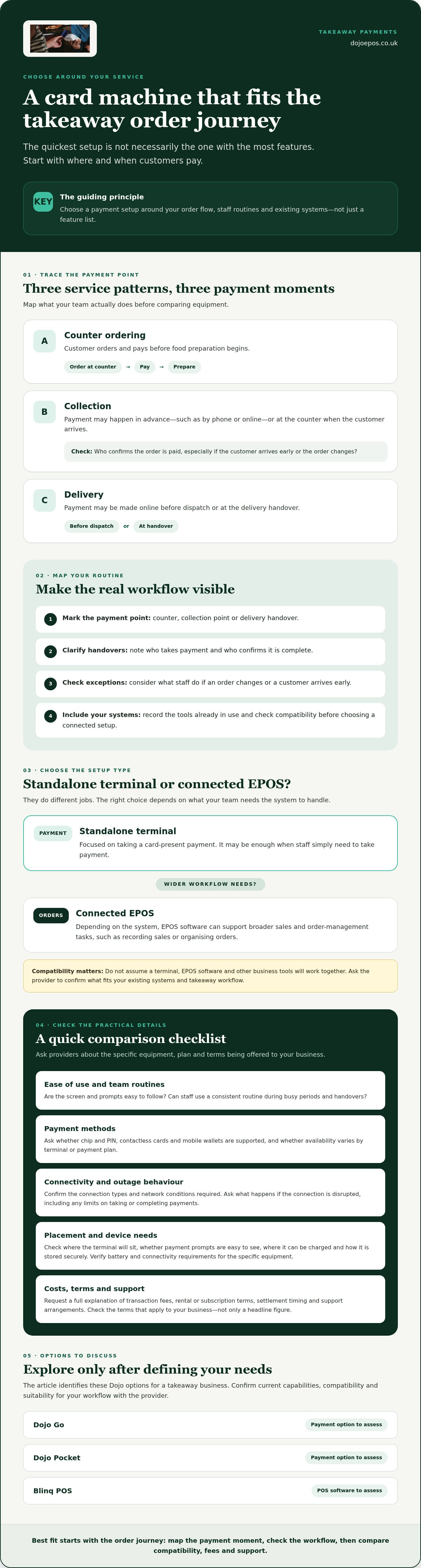
Start by tracing when payment happens. In a counter-ordering setup, a customer orders and pays before food preparation begins. Collection orders may instead be paid for in advance, such as when ordered by phone or online, or at the counter when the customer arrives. Delivery may involve payment online before dispatch or payment at handover. Each pattern puts the payment step in a different part of the process.
Write down where staff take payment and who confirms the order is settled. Note what happens when an order changes or a customer arrives early. This simple map gives you a practical way to compare setups against your team’s real routines.
Card machine or EPOS: what is the difference?
A standalone terminal focuses on taking a card-present payment. EPOS software can support broader sales and order-management tasks, such as recording sales or organising orders, depending on the system. They aren’t interchangeable: the terminal handles payment, while EPOS can help manage more of the transaction workflow.
You may need only a terminal for a simple counter service, or want to assess EPOS if your team needs wider sales and order tools. Before choosing a connected setup, ask the provider to confirm compatibility with your existing systems and takeaway workflow. Don’t assume a terminal, EPOS software and other business tools will work together without checking.
Make the decision around three things: your service model, staff routines and systems already in use. This gives you a practical starting point for comparing equipment and helps you avoid paying for functionality your team won’t use.
Which card machine features matter during takeaway service?
Choose features that remove friction from the payment step. Staff should be able to follow the same clear routine at the counter, even when orders are coming in quickly or team members change over. Check that the screen and prompts are easy to follow. Consider where the terminal will sit so customers can present a card or phone without disrupting the queue.
Confirm which payment methods the provider currently supports. Ask specifically about chip and PIN, contactless cards and mobile wallets, and whether support differs by terminal or payment plan. Don’t assume every method is available on every setup. Before comparing providers, request a full explanation of transaction fees, rental or subscription terms, settlement timing and support arrangements. Check the terms that apply to your business rather than relying on a general headline.
How do connectivity and terminal placement affect service?
Map where payments happen: at a fixed counter, a collection point or another service position. Then ask the provider which connection types the terminal requires, what network conditions it needs and how it behaves if the connection is disrupted. Confirm any limits on taking or completing payments during an outage instead of assuming the terminal can continue working.
Include practical details in your layout check. Is there a suitable place to charge the device? Can staff see payment prompts clearly, and can the terminal be stored securely when not in use? Verify battery and connectivity requirements for the specific equipment you’re considering.
When might connected EPOS be worth considering?
A standalone terminal may be enough if staff only need to take payment. Connected EPOS may be worth exploring if your team wants payment and order workflows to coordinate, but the available functions depend on the system. Ask which software, integrations and support are included, what works with your existing setup, and whether any elements are charged separately. For broader considerations, see this guide to integrated payment solutions.
Keep your checks focused on your operation. A card machine for takeaway business use should suit the counter routine, payment methods customers use and systems your staff rely on. Dojo offers payment terminals and Blinq POS software; ask the provider to confirm current connectivity, compatibility and suitability for your workflow. You can also review Dojo payment and POS options as part of your comparison.
Before agreeing to a setup, ask the provider to explain the applicable service terms, payment handling, fees and support arrangements in writing. This gives you a clear basis for comparing options and checking that the proposed equipment and workflow meet your business needs.
Three takeaway examples: match the card machine setup to your service
The best setup depends on where customers pay and how staff keep orders moving. Use these examples as starting points, then confirm each terminal’s functions, connectivity and compatibility with the provider before choosing.
Example: counter orders and collection payments
For a compact counter operation, one terminal at the ordering point may be a practical arrangement to investigate. Position it where staff can use it without reaching across food-preparation areas and customers can see when to tap or enter their PIN. For collection payments, agree a consistent handover routine so staff can identify the order and confirm its payment status. This can help organise the queue, but no equipment can guarantee faster service.
If staff need to record, locate or update orders as well as take payment, ask whether a separate order-management system would help. Confirm how it would fit with the payment setup rather than assuming the two are compatible.
Example: takeaway with delivery and online orders
Separate card-present payments, such as a customer paying at the counter, from online payment journeys completed before collection or delivery. Ask providers which channels their setup supports and whether sales from different channels can be reviewed together. Confirm exactly how reporting works and which systems or functions are included. For broader equipment considerations, see this guide to EPOS hardware for UK businesses.
Whatever the service pattern, check how payment equipment and staff processes protect payment information. The Payment Card Industry (PCI) security standards offer a starting point for understanding payment security. Ask your provider what applies to your setup and what steps your business needs to take.
How to compare takeaway card machines before choosing one
Compare each option against your actual service, not a feature list. A clear process helps you rule out unsuitable setups and spot cost or compatibility questions before you commit. Use these steps to assess a card machine for takeaway business needs:
Map payments. Note where customers pay, which payment methods you need and whether you take orders at the counter, online or for delivery.
List must-haves. Separate essential requirements, such as a suitable connection, from optional features your team may not use.
Check compatibility. Confirm that the terminal works with your existing EPOS or other relevant systems. Ask the provider to verify the exact setup.
Compare terms. Review transaction fees alongside rental or subscription charges, contract length, cancellation conditions and any additional service charges. Don’t assume one quoted rate tells the whole story.
Confirm support. Ask how to get help, when settlement takes place and whether eligibility conditions apply. Get the answers in writing.
What should you ask a payment provider?
Be specific: which card, contactless and mobile-wallet payments does the proposed terminal accept, and what connectivity does it require? Ask for a complete breakdown of transaction fees and recurring or additional charges, plus the contract terms. Confirm the support routes available, settlement timing and any conditions that affect your account. Written answers make it easier to compare providers on equal terms.
How can you test fit before committing?
Walk through a typical order with the provider, from taking payment to handing over the food. Check where the terminal sits, how staff confirm a payment and whether the steps feel clear during a simulated busy shift. If you plan to connect EPOS, confirm compatibility, setup responsibilities and any separate costs before installation. Involve the staff who will use the equipment every day.
Use the same checklist for each provider, then weigh the total contractual commitment against the needs you’ve identified. A low headline transaction rate may not reflect recurring charges or contract terms, whilst optional features only add value if they support your operation.
Once you’ve defined your requirements, review Dojo payment solutions and confirm which options, terms and setup are suitable for your takeaway.
How Dojo payment options could fit a takeaway business
Once you’ve mapped your payment points and must-haves, you can assess Dojo Go, Dojo Pocket and Blinq POS software. Dojo offers payment terminals as well as POS software, but the specific functions, connectivity and suitability of each option for a particular takeaway workflow need to be confirmed with the provider. Treat them as options to discuss, not an assumed match.
For a counter operation, ask which Dojo option may suit the fixed payment point and how staff and customers would use it. If your team takes payment at a collection point or elsewhere, confirm whether the proposed equipment supports that location and routine. For a takeaway using EPOS, ask whether Blinq POS supports your required order and payment workflow, and verify compatibility with any systems you already use.
Questions to ask about Dojo Go, Dojo Pocket and Blinq POS
Ask the provider to explain what each product does, then check its suitability for your service pattern. Confirm the payment methods and connectivity available, which POS workflows and integrations are supported, and whether the proposed setup includes the equipment, software and support you need. Request a clear breakdown of transaction fees, any rental or subscription charges, contract terms and other service charges before making a decision.
Check settlement timing and any eligibility conditions in writing. Dojo offers next-day transfers, but confirm the terms and eligibility that would apply to your business rather than assuming a particular transfer schedule.
Plan your next step with a provider
Prepare a short outline before you speak with a provider. Include where customers pay, whether you take counter, collection, delivery or online orders, how many staff need to use the setup, and which payment channels matter. Also note your connectivity arrangements, current POS systems and reporting needs. Specific requirements make it easier to assess whether a proposed card machine for takeaway business setup is a practical fit.
Ask the provider to walk through a typical order, from payment to handover, and clarify who is responsible for setup and confirming compatibility. Compare the written offer with your must-haves, including terms and support, before you agree.
Build a payment setup that’s ready for your next busy shift
The right card machine for takeaway business use starts with your order journey. Identify when and where customers pay, then compare terminals and EPOS against your staff routines, existing systems and essential requirements. Check connectivity, supported payment methods, fees, contract terms and support before you commit.
Dojo offers payment terminals and Blinq POS software, giving you options to assess against your workflow. Its charging model includes transaction fees and monthly rental or software subscription fees, so request a breakdown of the charges and terms for the setup you’re considering. Dojo also offers next-day transfers, but confirm the conditions and eligibility that apply to your business.
Ready to compare options for your takeaway? Explore Dojo payment solutions and discuss a setup that fits your requirements.
Frequently Asked Questions
What type of card machine is best for a takeaway business?
The best option depends on where customers pay and how your staff handle orders. A fixed counter may suit a terminal kept at the till, whilst collection or delivery handovers may call for a different arrangement. Consider whether you need payment equipment alone or POS software for wider sales and order workflows. Before choosing, check payment methods, connectivity, contract terms and compatibility with any systems you already use.
Can a takeaway business use a card machine without an EPOS system?
Yes, a takeaway can use a standalone card machine without EPOS if staff only need to accept card-present payments. EPOS may be useful if you also want software to support sales or order management, but its functions depend on the system. If you’re considering connecting a terminal to EPOS, ask the provider to confirm compatibility and clarify what equipment, software and services are included.
Do takeaway card machines accept contactless payments and mobile wallets?
Some terminals support contactless cards and mobile wallets, but acceptance depends on the specific device and provider arrangement. Check that the payment methods your customers use are supported, and ask whether this differs by terminal or contract. A provider can confirm current capabilities and any relevant conditions. Don’t assume support for one payment method means every card, phone or wearable wallet will work with your setup.
Does a takeaway need a portable card machine?
Not always. A terminal kept at a fixed counter may be suitable if customers pay in one place. Consider portable equipment if staff need to take payments at a separate collection point or during delivery handovers, then confirm the device’s connectivity, charging needs and suitability with the provider. Base the decision on your actual payment locations and routines, rather than paying for flexibility your team won’t use.
How much does a card machine for a takeaway business cost?
The cost depends on the provider’s terms and the setup you choose. Ask for a full written breakdown of any upfront or recurring terminal charges, transaction fees, software subscriptions and additional service charges. Check the contract length, cancellation terms and whether fees vary by payment type or transaction. Compare the total commitment against your expected use, rather than judging an offer by one headline rate.
Can a takeaway card machine process online and in-person payments?
A card machine is generally used for in-person card-present payments, whilst online orders follow a separate payment journey. Some providers offer solutions for both channels, but don’t assume a particular terminal handles online payments or that transactions are automatically combined in reporting. Ask which channels the provider supports, how each is set up, and whether your chosen systems can give you the reporting your business needs.
How quickly will card payments reach my takeaway business bank account?
Settlement timing depends on the provider’s terms and the arrangement for your account. Dojo offers next-day transfers, but timing, conditions and eligibility should be confirmed directly before you rely on it. Ask when funds are normally transferred, whether weekends or bank holidays affect the schedule, and if any account or transaction requirements apply. Get the applicable settlement terms in writing.
What should I check before switching card machine provider?
Compare transaction fees, terminal or software charges, contract length, cancellation conditions and any additional service costs. Confirm that the new provider supports your required payment methods, connectivity and EPOS systems. Ask about settlement timing, support arrangements and who handles setup. Before switching, check your existing agreement for notice periods or outstanding commitments, then get the new terms and any compatibility details in writing.


Comments