
Efficient Restaurant Payments: Practical UK Guide 2026
What makes efficient restaurant payment systems useful beyond simply accepting a card? During a busy service, every extra step at the till or table can slow staff down. An efficient setup supports the full journey, from taking payment to reviewing and reconciling sales.
It’s easy to focus on payment speed alone. But if staff have to switch between disconnected tools, or the process doesn’t suit dine-in, takeaway and mixed service, friction can arise before and after the customer pays. Changes can also unsettle staff and diners, so improvements need to work in practice, not just on paper.
This guide shows you how to spot payment friction and compare systems against practical operational needs. You’ll look at how payments fit different service styles, how connected payment and POS workflows can support the team, and what to consider when reviewing sales. You’ll also learn how to test changes without making service more disruptive than it needs to be.
Table of Contents
What makes an efficient restaurant payment system?
A payment should feel like the natural finish to a meal, not a fresh obstacle after the plates are cleared. But the card transaction is only one part of the process. Staff need to confirm the correct bill, take payment, close the table and ensure the sale is recorded clearly. If a step is confusing or depends on a handover that’s easy to miss, the customer may wait while staff work out what to do.
An efficient restaurant payment system makes each payment step clear and dependable for customers, staff and the people who review sales afterwards. That means looking beyond terminal speed. The workflow should make it straightforward to present the bill, confirm payment and review the matching sale record. A Point of Sale (POS) system can help organise sales at the point where customers pay.
Focus on the handovers. Can a team member tell which bill is ready to settle? Is it clear when payment has been accepted and the table can be closed? Can the person reviewing sales later understand what was taken and recorded? These questions reveal operational friction that a focus on transaction speed alone can miss.
Where payment friction appears during restaurant service
Follow the customer-facing journey: a diner asks for the bill, a staff member retrieves or prepares it, payment is taken, the result is communicated, and the table is closed or made ready for its next use. Friction can arise when a bill needs correcting, the payment device has to be fetched, or staff aren’t sure who should complete the final step. Each unclear handover can mean another trip, check or conversation.
Then look beyond the table. A customer waiting to pay experiences a service delay; a staff member later matching payment records to sales faces an administrative task. These are separate parts of the workflow, but a missing or unclear record can create extra work after service. Map them separately to see whether the issue sits with the guest experience, staff procedure or end-of-day review.
Why payment efficiency is more than transaction speed
A quick transaction helps only if the surrounding process works too. Staff need to understand the steps, know what to do when something needs attention and see when a payment is complete. Dependable processing and clear sales records also help the team finish service confidently and make reconciliation easier to follow.
The right setup depends on how your restaurant operates. A dine-in venue may need a smooth bill-to-payment handover at the table or till. Takeaway service has a different rhythm, and a mixed operation must accommodate both. Start with your own service flow, the tasks staff repeat and the records the team needs afterwards. That gives you a practical definition of efficiency for your restaurant, rather than assuming one workflow suits every operation.
How restaurant payment systems connect the payment journey
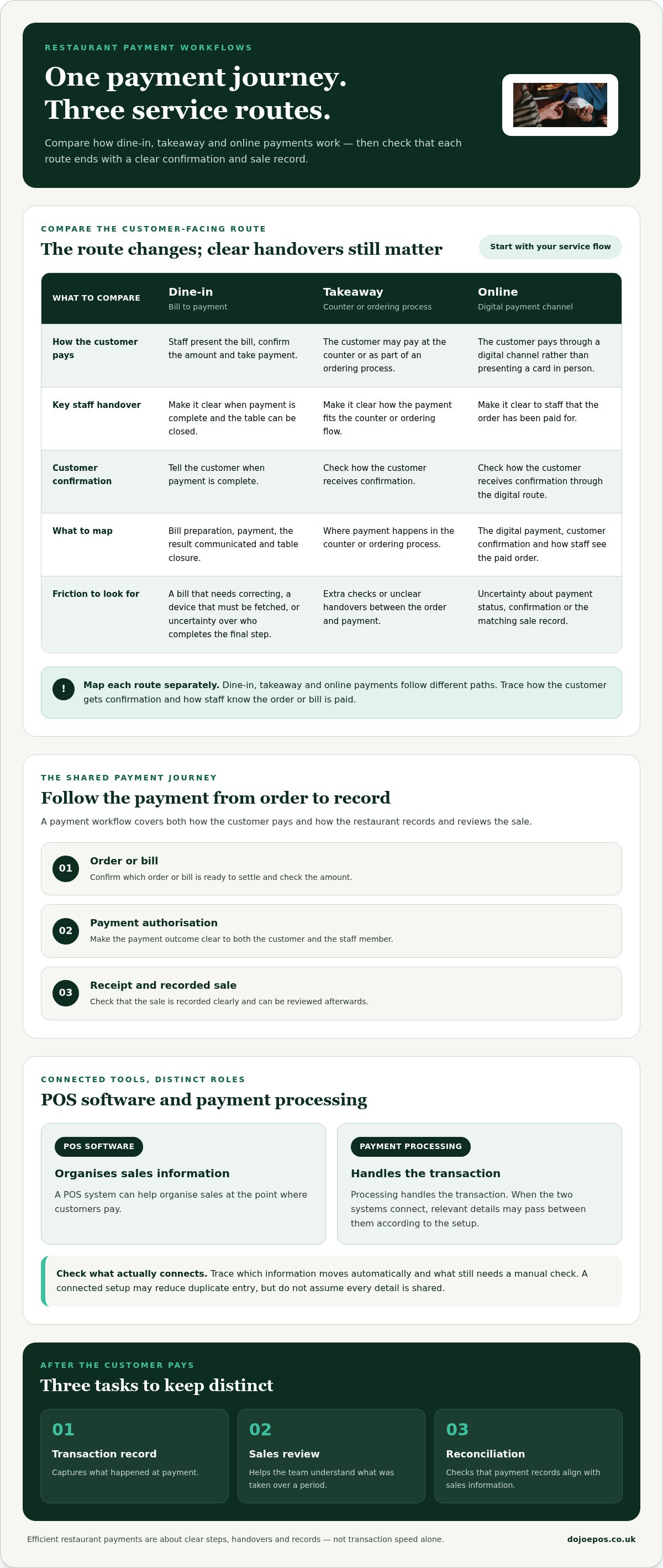
A restaurant payment involves more than a customer presenting a card. The process starts with an order or bill, moves through payment authorisation, and ends with a receipt and a sale record that staff can review. Each stage needs a clear outcome. If payment is accepted but the bill remains open, or the sale is recorded separately from the payment, staff may need extra checks to understand what happened.
A payment workflow covers both how the customer pays and how the restaurant records and reviews the sale. POS software and payment processing have related but distinct roles: POS software can organise sales information, while payment processing handles the transaction. When the two connect, relevant details can pass between them according to the setup. That may reduce duplicate entry, but assess the actual workflow rather than assuming every detail is shared.
The customer-facing steps from bill to completed payment
For dine-in service, staff present the bill, confirm the amount, take payment and let the customer know when it’s complete. A clear prompt on the payment device and a consistent staff handover help everyone understand the next step. If a bill needs adjusting, staff should know how to resolve it before taking payment, so the customer isn’t left uncertain about whether the correct amount has been charged.
Takeaway and online ordering follow different paths. A takeaway customer may pay at the counter or as part of an ordering process; an online customer pays through a digital channel rather than presenting a card in person. Map each route separately, including how the customer receives confirmation and how staff know the order has been paid for.
Consistent language matters. A clear confirmation reassures the customer and helps staff move on to the next task. It won’t guarantee faster service, but it can prevent avoidable uncertainty, repeated checks or a handover that leaves the bill’s status unclear.
The staff and back-office steps after payment
After the customer-facing transaction, distinguish three tasks: keeping a transaction record, reviewing sales and reconciling records. A transaction record captures what happened at payment; sales review helps the team understand what was taken over a period; reconciliation involves checking that payment records align with sales information. These tasks are connected, but they aren’t interchangeable.
When POS software and payment processing share relevant data, staff may be able to reduce duplicate entry and compare records more easily. Trace what information moves automatically and what still needs a manual check. This guide to integrated payment solutions explains how payment channels can connect. Dojo payment solutions include integrated payments, alongside card-present and online payment options.
How to compare efficient restaurant payment systems
Compare the whole working day, not just the moment a card is tapped. A system may look straightforward at the till but create extra steps for staff, leave managers piecing together sales information or fail to suit the way orders move through your restaurant. List the tasks your team needs to complete, then assess each setup against the same criteria.
Separate essentials from useful extras. Essentials are capabilities your current service depends on, such as supporting the payment channels you use and producing records the team can review. Extras may be beneficial, but they shouldn’t outweigh a basic workflow problem. This keeps the comparison focused on operational fit, rather than a headline feature or a claim about transaction speed.
Service fit: Does the payment flow suit your dine-in, counter-service, takeaway or mixed operation?
Staff usability: Can the people who take payment follow clear, repeatable steps?
Payment channels: Does the setup support the in-person and online routes your restaurant uses?
Reporting: Can managers access payment and sales information for routine review?
Support: Is there a clear route for staff to get help with operational questions or issues?
Match system capabilities to your restaurant service model
Map the payment steps for each service type before comparing systems. Dine-in may involve presenting a bill and settling it at the table or counter. Counter service and takeaway can place payment earlier in the order journey, while a mixed model needs a consistent way to handle several routes. Note which staff roles use each step and where a handover occurs. For hospitality venues with bar service, the pubs and bars payment guide offers a related perspective.
Use real tasks to test the fit. Could a team member identify the right amount, take payment and recognise completion without asking a colleague to interpret an unclear status? Consider busy periods as well as quieter service, and include the people who use the process day to day. A system that suits one service model may not suit another.
Assess usability, payment records and integration needs
Look at routine tasks from both staff and manager perspectives. Staff need understandable steps for taking and confirming payment; managers need usable payment and sales information for regular reviews. Check which records appear in each system, and whether matching them involves extra copying or manual entry. These details reveal the work behind the visible transaction.
Be specific about integrations. A connected workflow can reduce duplicate entry when the relevant systems exchange the required information, but not every tool or data point necessarily connects automatically. Record what the setup does, what requires a separate tool and what remains a manual task. Then compare efficient restaurant payment systems against your essential requirements before weighing any extras.
How to improve payment efficiency without disrupting service
Make changes in stages, with a clear picture of the current workflow before you alter it. A practical audit helps distinguish a system issue from a training gap or an unclear handover. It also gives you a baseline to review later, without relying on made-up time or revenue targets.
Audit the current payment process
Ask front-of-house staff where they repeat questions, wait for a handover or enter the same information more than once. Map customer-facing steps separately from tasks such as checking sales records after service. Note where issues occur, what triggers them and who is affected. Prioritise recurring friction that makes service inconsistent or leaves records harder to review.
Map the workflow. Write down the steps for each payment route, from the customer’s order or bill through payment confirmation and the related sales record. Include staff roles, handovers and what happens if a payment needs attention.
Prioritise the friction. Keep a simple record of repeated questions, manual work, unclear payment status and difficult record checks. Group issues by cause, then focus first on those that disrupt consistent service or create avoidable back-office work.
Test one change. Choose a controlled trial, such as a suitable service period or a limited part of the workflow. Define what staff should do and what you’ll observe. A small trial makes it easier to spot unexpected steps before extending a change across the team.
Train the team. Give staff concise guidance on routine payments, correcting common errors and escalating issues. Practise the steps in context, and make sure everyone knows how to recognise when a payment is complete and what to do if it isn’t.
Review and refine. Ask staff what felt clearer and where confusion remains. Compare the new process with your baseline notes: did it remove repeated actions, or simply move them elsewhere? Check that payment records remain understandable for later review before adopting the change more widely.
Introduce changes with staff and customers in mind
Tell the team what is changing and why before a trial begins. Keep instructions close to the tasks they describe, and give staff a clear route for raising problems during the test. Where customers will notice a different payment step, explain it simply so the change feels deliberate rather than uncertain. Gather feedback promptly, while the details are fresh.
Don’t judge a trial on one smooth transaction. Review the full routine, including handovers, exceptions and sales records. If a change removes one step but adds another that staff find harder to follow, adjust it before wider adoption. A measured rollout helps protect service continuity whilst giving the team a say in how payment systems work day to day.
Once you’ve identified your workflow requirements, review Dojo payment solutions alongside your priorities for payment and POS processes.
How Dojo can support an efficient restaurant payment setup
Once you’ve mapped your service flow and set your comparison criteria, assess Dojo against the operational needs you’ve identified. Dojo offers payment hardware, including Dojo Go and Dojo Pocket, alongside Blinq POS software and integrated payments. These options cover parts of the customer-facing payment process and the wider payment setup.
Match each option to a real task in your workflow. Consider where your team takes card payments, which roles handle them and what sales information staff need to review afterwards. Compare those requirements with Dojo’s payment hardware, Blinq POS software and integrated payments, and note where handovers or manual tasks remain.
Bring payment hardware and restaurant workflows together
Payment hardware is part of the customer’s card-present experience, but its value depends on how naturally it fits the service routine. Consider who presents the payment device, where the customer completes the transaction and how staff recognise that payment is complete. Dojo Go and Dojo Pocket are payment hardware options for restaurants to assess against these needs. The EPOS hardware buying guide can help frame the practical considerations involved in selecting equipment.
Blinq POS software and integrated payments are also relevant when reviewing how sales and payment steps sit alongside each other. Consider how they fit the tasks your restaurant needs to complete: what staff do during service, what managers need for routine sales reviews and which payment channels your operation uses.
Choose a next step based on operational priorities
Keep your priorities visible as you compare: service flow, staff usability, payment channels and clear records. Rank them by how directly they affect your day-to-day operation. A dine-in restaurant may focus on how staff take payment against a bill; a takeaway or mixed-service venue may need to account for different customer payment routes. Start with your specific working pattern.
Then compare those needs with Dojo’s payment hardware, Blinq POS software and integrated payments. Note which requirements each option supports and what workflow it would improve. This keeps the decision grounded in practical fit, not broad promises about speed or savings. It also gives staff a clear basis for understanding any proposed change before it becomes part of service.
Build your next step around the workflow you want to improve. Explore Dojo solutions for your restaurant and assess how they could support efficient restaurant payment systems in your operation.
Make your next payment improvement count
Choose one workflow to improve first. A clearer handover, a more consistent payment routine or easier access to sales information can give your team a practical starting point without requiring every process to change at once. Keep the change grounded in what staff and customers need, then build on what you learn.
The best efficient restaurant payment systems are those that suit the way your restaurant operates, including the payment channels your customers use. Dojo provides card-present and online payment solutions for UK businesses, giving you an option to consider as you decide what comes next.
Use your priorities to guide the decision and take a measured step towards a payment setup that works for your service. Explore Dojo payment solutions for your restaurant.
Frequently Asked Questions
Can a restaurant use one payment system for dine-in and takeaway orders?
Yes, if the setup supports the payment channels and order flow your restaurant needs. For example, dine-in customers may pay at the table, whilst takeaway orders could be paid for at collection or online. Before adopting one system, check how staff identify paid orders, handle changes and distinguish payment records across service types. A shared setup can be useful, but only if it keeps each route clear for staff and customers.
How can restaurants reduce errors when taking card payments?
Use a consistent check before submitting each payment: match the amount on the device to the bill, confirm any agreed adjustment, then let the customer complete the transaction. Train staff to check the payment result before closing the order, especially if a customer or colleague interrupts the process. Clear procedures for refunds and corrections also help prevent an incorrect amount being treated as settled or entered twice.
What should a restaurant do if a card payment is declined?
Tell the customer discreetly that the payment hasn’t completed, without guessing why. Ask them to check the card or try another payment method, and follow the prompts shown by the payment device. Avoid repeatedly submitting the same declined payment. Keep the order marked as unpaid until a successful payment is confirmed, so another staff member doesn’t mistake it for a completed sale or serve it under the wrong status.
Can restaurant payment systems support tips and service charges?
Some setups may support tips or service charges, but the available options depend on the system and how the restaurant configures it. Decide how staff should present each option, make any charge clear to customers and ensure the final amount is understood before payment. Keep tips distinct from a service charge in your procedures and records. UK businesses must not add a card-payment surcharge to a customer’s bill.
How should a restaurant protect cardholder data?
Limit who can access payment devices and records, and train staff not to write down or share card details. Use payment equipment and processes designed to handle card payments securely, and keep staff guidance current as procedures or systems change. Review applicable PCI DSS guidance with your payment provider or acquiring bank, since security requirements depend on how payments are accepted and handled. Don’t retain sensitive card information in informal notes or messages.
What should restaurant staff do if the payment system loses connectivity?
Pause and check the device status before trying the payment again. If the outcome is unclear, verify the transaction record first to avoid charging the customer twice. Follow your restaurant’s outage procedure, explain the situation calmly and use another accepted payment method if available. Don’t assume a device can store or process payments offline; only use an offline function if it’s supported and staff have been trained on its risks and steps.


Comments