
Payment Processing for Hairdressers: A UK Guide for 2026
Could your payment setup make checkout feel like a natural final step in an appointment, rather than another admin task? Payment processing for hairdressers should fit the way your salon works, but unclear fees, settlement times and equipment choices can make it hard to know where to start.
You need a setup that lets clients pay smoothly without pulling your focus from the chair. A card machine may cover a straightforward checkout, whilst a POS setup could suit a busier salon with more involved payment workflows. The right choice depends on how your business runs, not simply on the headline transaction rate.
This guide explains how salon payments move from a customer transaction to settlement, what processing fees can include and how to compare options for your business size and team. You’ll also see how Dojo Go, Dojo Pocket, Blinq POS software and next-day transfers can fit different workflows, so you can make checkout and payment admin easier to manage.
Table of Contents
Payment processing for hairdressers: what happens when a client pays?
The appointment is finished, the client is ready to leave and payment should be the simplest part of the visit. A clear checkout helps you wrap up confidently, whether you’re taking payment for a cut, a colour service or products bought at the salon. If payment records are disconnected from appointment and sales records, checkout can slow down the next client and make it harder to reconcile takings later.
Payment processing for hairdressers covers the steps that carry a client’s payment through authorisation and settlement so funds can reach your merchant account. It forms part of a wider payment system, involving the technology and organisations that enable payments. Accepting payment is only one part of record keeping: you still need to record what the client paid for, and account separately for a tip, refund or product sale where relevant.
What happens after a client taps or inserts a card?
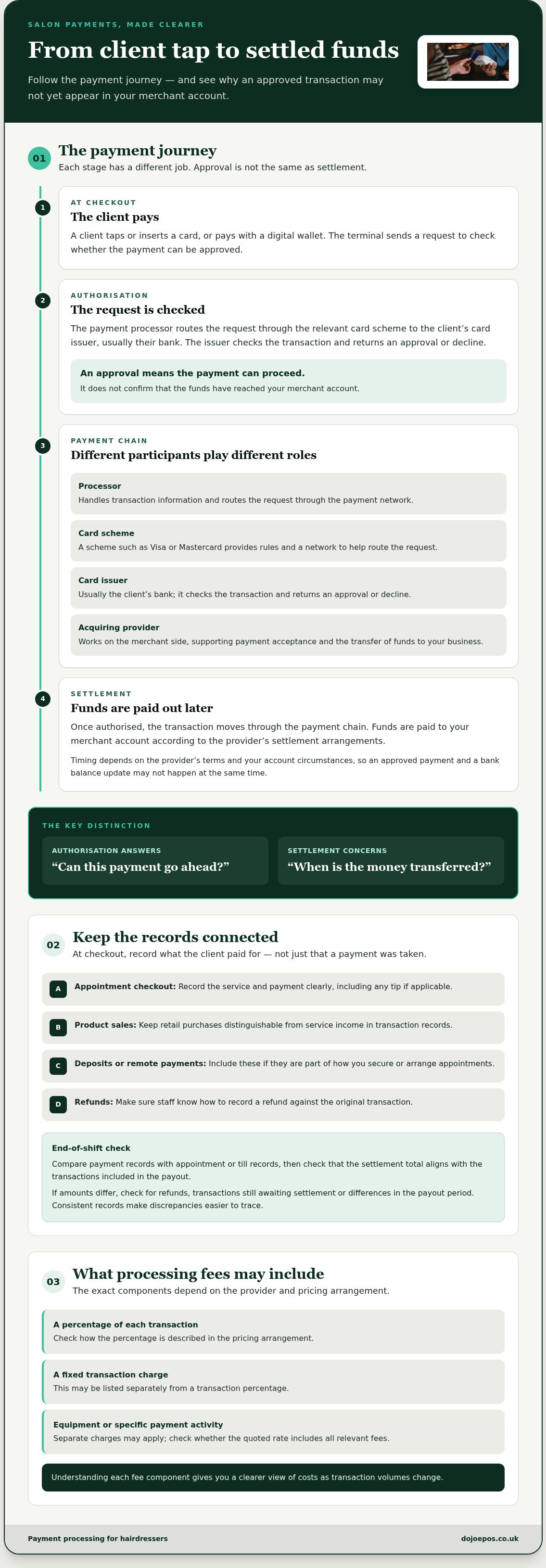
The terminal sends a request to check whether the payment can be approved. The payment processor routes that request through the relevant card scheme to the client’s card issuer, usually their bank. The issuer checks the transaction and returns an approval or decline. An approval confirms that the payment can proceed at that point, but it doesn’t mean the funds have already arrived in your merchant account.
Settlement happens afterwards. The transaction moves through the payment chain, and funds are paid out according to the provider’s settlement arrangements. Authorisation and settlement are different stages: one answers “can this payment go ahead?”, whilst the other concerns when the money is transferred. That distinction explains why an approved transaction and a bank balance update might not happen at the same time.
Which salon payment situations should your setup handle?
Start with the full client journey, not just the tap at the till. A salon-based hairdresser may take payment after an appointment and sell shampoo or styling products at checkout. A freelance stylist might work across different settings, whilst a mobile hairdresser may need to take payment away from a fixed reception desk. The practical setup should match where and how you serve clients.
Think through the transactions your routine may involve:
Appointment checkout: Record the service and payment clearly, including any tip if applicable.
Product sales: Keep retail purchases distinguishable from service income in your transaction records.
Deposits or remote payments: Include these if they’re part of how you secure or arrange appointments.
Refunds: Make sure staff know how to record a refund against the original transaction.
Consistent records help you compare transaction totals with appointments and sales at the end of the day. They also make it easier to spot a missing payment or explain a refund without relying on memory. Decide what needs to be recorded at checkout, then build that routine into how your team closes each transaction.
How payment processing for hairdressers moves from checkout to settlement
A client taps a card or digital wallet at checkout. The terminal sends the transaction for approval, payment participants exchange the information needed to handle it, and the funds are settled to your merchant account later. Understanding each stage helps you distinguish a successful checkout from money arriving in your account.
Authorisation, processing and settlement: what each stage means
Authorisation is approval to proceed, not confirmation that money has reached your bank. The processor handles transaction information and routes it through the payment network. The card scheme, such as Visa or Mastercard, provides rules and a network to help route the request. The card issuer, usually the client’s bank, checks it and returns an approval or decline.
The acquiring provider works on the merchant side of the transaction, supporting payment acceptance and the transfer of funds to your business. These roles can sit within a connected payment service, so you won’t necessarily deal with each organisation separately. Once authorised, the transaction proceeds towards settlement. Timing depends on the provider’s terms and your account circumstances, so don’t assume an approved payment will appear in your bank balance straight away.
For context on the wider infrastructure behind payments in the UK, the Bank of England’s role in payment systems includes operating core payment services. These underpin parts of the wider payments landscape, rather than acting as the direct authoriser of a client’s card purchase at a salon.
Where payment records and fees fit into the process
Each transaction creates a record that can help you match card takings to appointments, product sales and refunds. At the end of a shift, compare payment records with your appointment or till records, then check that the settlement total aligns with the transactions included in the payout. If amounts differ, look for refunds, transactions still awaiting settlement or differences in the payout period. A consistent routine makes discrepancies easier to trace.
Fees can include more than one component. Depending on the provider and pricing arrangement, they may include a percentage of each transaction, a fixed transaction charge, or separate charges for equipment or specific payment activity. Check how each element is described and whether the quoted rate includes all relevant charges. That gives you a clearer view of costs as transaction volumes change. For a closer look at possible fee structures, see the Dojo card machine rates guide.
Map these stages against your appointment and payout records to decide what information your team needs at checkout. Dojo payment solutions include terminals, POS software and integrated payments to support different business workflows.
Card machine, POS or integrated payments: which setup suits your salon?
The best setup is the one that fits your checkout and record-keeping routines, not necessarily the one with the most functions. A sole trader who takes a few payments at a fixed chair may need little more than card acceptance. A salon with several stylists, retail sales and frequent transactions may value a clearer view of sales across the day. Payment processing for hairdressers can be simple or connected, depending on how the business works.
Payment processing for salon owners, chair renters and mobile hairdressers
For a salon owner, consider appointment volume, number of staff and whether you sell products as well as services. A busy checkout or several staff handling transactions can make organised sales records more valuable. A mobile hairdresser may prioritise portability and the ability to take payment away from a fixed till. Chair renters should also consider how to keep their transaction records distinct from the salon’s, especially if they manage their own client payments and takings.
When does a hair salon need POS or integrated payments?
A POS or integrated setup can be useful when you need more than a way to accept payment, for example, to organise service and retail sales or connect payment activity with another business system. Payment acceptance doesn’t automatically include appointment booking, accounting or broader business management. Those functions depend on the tools you use and how they connect. If your current records are easy to manage, a full POS setup may add complexity without solving a real problem.
Before choosing, note where you enter appointment details, record sales, take payments and review takings. Identify repeated work or gaps, then decide whether connecting systems would address them. Integrated payments can bring payment activity into a wider workflow, whilst your salon’s actual needs should guide the choice.
Set up salon payment processing for smoother daily operations
A well-planned payment routine helps staff finish each appointment confidently and keep the day’s records in order. Before choosing or changing a setup, map what happens from the end of a service to the point where you check your takings. Payment processing for hairdressers works best when everyone knows the next step, including how to handle a payment query or refund.
A salon-ready payment workflow links the completed service to payment confirmation, a clear transaction record, a consistent refund process and a regular reconciliation routine.
Build a reliable client checkout routine
Decide who confirms the service total, who takes payment and how the client receives confirmation or a receipt. In a busy salon, agree where the device is kept and who can access it, so staff aren’t searching for equipment or sharing logins at checkout. Make the same process work for quieter appointments, retail sales and times when several clients are ready to pay.
Give staff a simple procedure for correcting an entry, handling a refund and responding to a transaction query. Record what happened and retain the relevant transaction reference, so the team can investigate without relying on memory. Make clear who can approve or process refunds, and how staff should escalate a payment that appears incomplete or duplicated. Practise the routine with the people who will use it before making it standard practice.
Keep payment records clear and handle data responsibly
Set a regular time to compare completed appointments and product sales with payment records. For example, a daily check can help you spot a missed transaction or identify a refund that needs explaining. If more than one stylist takes payments, decide how transactions will be attributed and recorded so the salon can review totals consistently.
Limit access to payment devices and account records to the people who need it. Use individual access where available, keep devices secure when they’re not in use and follow your payment provider’s instructions for handling payment information. Avoid copying sensitive card details into appointment notes, messages or other records. These are prudent handling practices, not a guarantee of compliance. Security standards and UK requirements can change, so check current guidance from relevant authorities and your provider before setting or updating procedures.
Map the steps from service completion to payment confirmation and receipt.
Assign responsibility for taking payments, correcting records and handling refunds.
Make sure staff know how to access devices and transaction records during busy periods.
Reconcile appointments, retail sales, refunds and payment records on a routine basis.
Restrict access to payment information and follow current provider and security guidance.
Turn this checklist into a short staff routine, then review it whenever your team, checkout process or payment setup changes. Dojo’s payment solutions include options for different salon workflows.
How Dojo supports payment processing for hairdressers
Dojo is a UK-based payment provider offering card-present and online payment solutions. For salons, the right combination depends on where clients pay, how the team records transactions and whether payment information needs to connect with other business systems. Dojo serves over 110,000 businesses worldwide and offers payment terminals, POS software and integrated payments.
Think of payment processing for hairdressers as a workflow decision, not just a choice of device. A freelance stylist taking payments at a client’s home may have different needs from a salon team managing checkout and product sales at a fixed location. Start with the tasks you need to complete, then choose the Dojo options that fit them.
Match Dojo payment options to the way your salon works
Dojo Go and Dojo Pocket are payment terminal options. Consider where clients pay and how your team will handle checkout. This helps you focus on the terminal’s role in your routine and choose an option that suits the way you work.
Blinq POS software is an option for businesses that need a point-of-sale system alongside payment acceptance. Think about what sales information you want to organise and which tasks you expect the POS to support. Payment acceptance processes the transaction, whilst POS software can form part of a wider sales workflow.
Integrated payments suit businesses looking to connect payment activity with other systems or processes. Map where appointment, sales and payment information currently sits. This helps you identify which connections could reduce repeated admin and which records still need to be managed separately.
Explore a payment setup built around your business
Use your payment journey to narrow the options. List where payments happen, who takes them, what you sell and how you review transactions. A simple checkout routine may point towards a terminal-led approach; a team that needs to organise sales information may also want POS software. If connecting payment activity to other systems matters, consider integrated payments as part of the workflow.
Dojo also offers Next-Day Transfers. Transfer timing and eligibility depend on the applicable terms and account circumstances, so assess it against your cash-flow needs rather than treating it as a guaranteed settlement time. Consider how the payout schedule fits your reconciliation routine and the way you manage business funds.
Choose a setup that supports the work you do today and makes payments easier to manage as your salon’s needs evolve. Explore Dojo payment solutions and compare the available options with your business workflow.
Make your next payment setup work harder for your salon
Choose your next step by looking at the moments that interrupt service or leave you unsure about your takings. Is checkout taking too long? Are staff duplicating entries? Does your current setup still suit the way you work? These answers give you a practical basis for deciding what to change, rather than adding technology for its own sake.
The right payment processing for hairdressers should support your client experience and day-to-day routines as your business develops. Write down the improvements that matter most, then compare them with your current setup. A clear priority, such as simpler checkout or more organised payment records, helps you focus on an option that fits instead of getting distracted by features you won’t use.
Take the next step with a payment partner that supports different business workflows. Explore Dojo payment solutions and consider how they could fit the way your salon takes payments. A smoother payment routine can give you more space to focus on your clients and grow with confidence.
Frequently Asked Questions
How much does payment processing cost for a hairdresser?
Costs depend on your provider, pricing structure and how your salon takes payments. Charges may include a percentage of each transaction, a fixed monthly terminal rental or software subscription, and other fees set out in your agreement. Dojo charges transaction-based fees and monthly rental fees for payment hardware, with software subscriptions for Blinq POS. Compare the full cost structure with your expected card sales and transaction volume, rather than judging a setup by one fee alone.
Can freelance hairdressers take card payments without a salon?
Yes. A freelance hairdresser can accept card payments without operating from a salon, using a payment terminal suited to their working routine. For home visits or work in different settings, consider how you’ll carry and access the terminal, check each payment and keep records separate from any salon’s takings. Dojo offers payment options including Dojo Go and Dojo Pocket for different payment workflows.
How long does it take for hair salon card payments to reach the business account?
It depends on the provider’s settlement terms and your account circumstances, so an approved payment may not appear in your bank account immediately. Check the payout schedule and how weekends or bank holidays are handled when planning cash flow. Dojo offers Next-Day Transfers, but timing and eligibility depend on applicable terms. Build your reconciliation routine around your account’s payout information, rather than treating each card approval as a completed bank transfer.
Do hairdressers need a POS system to accept card payments?
No. A POS system isn’t essential just to accept a card payment. A standalone payment terminal may be enough if you record appointments and sales elsewhere and can reconcile them easily. A POS setup may be useful if you want to organise service and retail sales together or manage transactions across a team. Choose based on the records and workflow you need, not the assumption that every salon requires a full POS system.
Can a hairdresser take a deposit before an appointment?
Yes, if your payment setup supports taking payments before the appointment, such as through an appropriate online payment method. Decide how deposits will be linked to bookings, recorded against the final bill and handled if an appointment changes or is cancelled. Make the deposit amount and relevant terms clear to clients before they book. This helps set expectations and gives you a consistent process for applying or refunding a deposit.
What payment methods should a hair salon accept?
Offer methods that suit how clients book and pay. For in-person appointments, consider card and contactless payments, including digital wallets where supported by your payment setup. If you take bookings remotely or collect deposits, an online payment option may also be useful. Keep a clear record of each method so you can match receipts and refunds against sales. Review the choices your clients actually use and avoid adding options that complicate checkout without serving a need.
How can hairdressers keep card payments secure?
Use payment equipment and services from a provider that gives clear instructions for handling transactions, and make sure staff follow that guidance. Limit access to payment devices and account records to people who need it. Don’t write card details in appointment notes or retain them in messages. Keep devices secure, and check current guidance from your provider and relevant UK authorities when setting or updating your payment-handling procedures.


Comments