
Card Machine Rental UK: 2026 Guide for Businesses
The lowest monthly terminal charge doesn’t necessarily mean the lowest-cost payment setup. If you’re weighing up card machine rental uk options, compare the rental, transaction processing fees and any other charges in the agreement.
It’s understandable to focus on the monthly cost, especially when you want dependable equipment without an unsuitable long-term commitment. Renting, buying and pay-as-you-go arrangements work differently, and the right fit depends on how and where your business takes payments. A headline rate alone won’t show the full picture.
This guide explains what card machine rental can involve and how it compares with buying. You’ll learn which contract details and potential charges to examine, how rental costs sit alongside processing fees and software subscriptions, and what to consider when matching a payment setup to your daily operations. We’ll also look at how Dojo’s terminals, software and payment services fit into the wider picture, so you can make an informed choice.
Table of Contents
Card machine rental in the UK: what are you paying for?
With card machine rental uk arrangements, a business pays to use payment hardware under agreed terms rather than buying the terminal outright. The agreement sets out which equipment is provided, what you pay and which services are included. Check those details before comparing offers: the word “rental” alone doesn’t tell you what the arrangement covers.
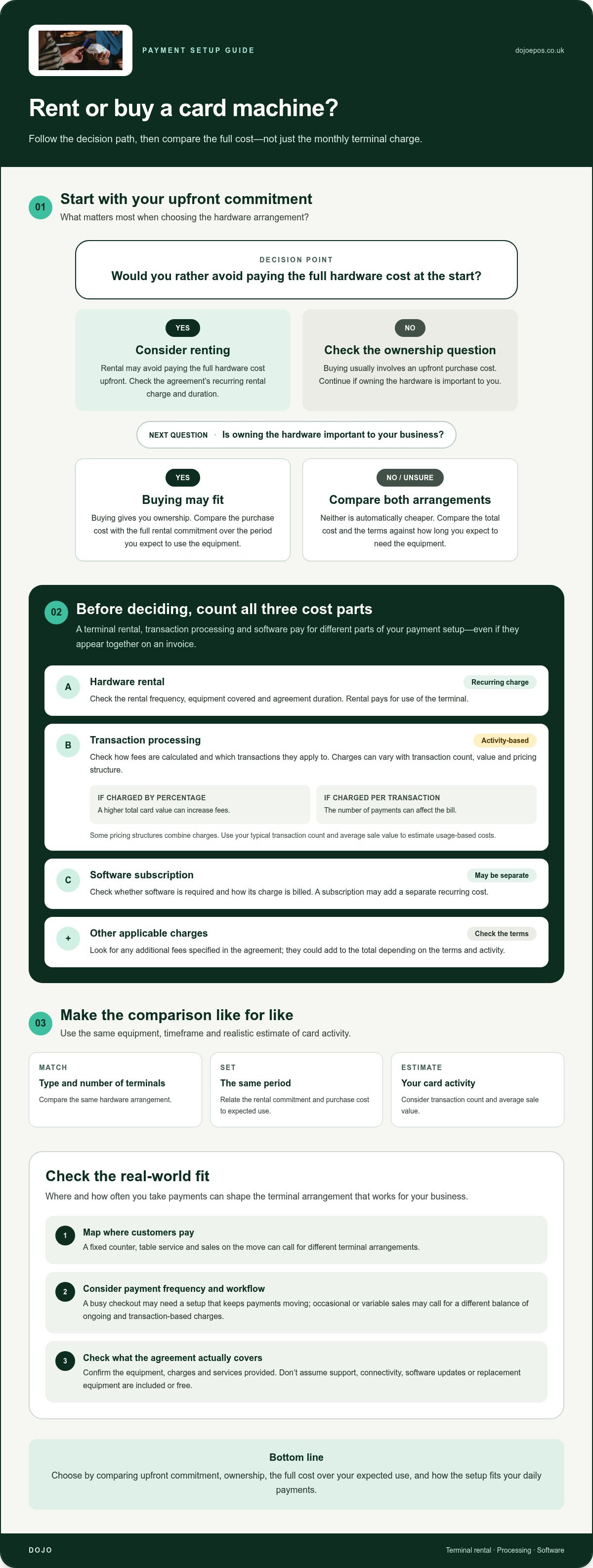
A card machine, also known as a payment terminal, is used to take card payments. Rental covers use of the hardware. It’s separate from the fee for processing transactions and from any subscription for point-of-sale software. These charges may appear together on an invoice, but they pay for different parts of your payment setup.
What can a card machine rental arrangement include?
The terminal is the central part of a rental arrangement, but other services depend on the agreement. A provider may set separate charges for hardware, payment processing and software. Don’t assume technical support, connectivity, software updates or replacement equipment are included. Look for each item in the terms and note whether it carries a separate charge.
For example, a business could pay a recurring rental charge for its terminal, transaction fees as customers pay by card, and a software subscription for point-of-sale tools. Dojo rents card machines including Dojo Go and Dojo Pocket, and offers payment processing and Blinq POS Software as part of its wider payments setup. Hardware rental, processing and software may each have separate charges.
Which UK businesses might consider renting a card machine?
Rental may suit a business that needs to take in-person card payments but would rather not buy its hardware outright. The practical setup depends on where customers pay. A fixed counter, table service and sales made on the move can call for different terminal arrangements, so consider how staff will take payments during a typical shift.
Transaction volume and workflow matter, too. A busy checkout may need a setup that keeps payments moving, whilst a business with occasional or variable sales may prioritise a different balance of ongoing and transaction-based charges. Map out where payments happen, how frequently they’re taken and whether software needs to connect with the payment process. That gives you a clearer basis for judging whether rental fits your day-to-day operations.
In short, compare the complete arrangement, not just the terminal. The contract sets out the equipment, charges and services provided, and is the clearest guide to what you’re paying for.
How card machine rental costs work beyond the monthly charge
A monthly rental charge is only one part of the total cost of accepting card payments. To compare card machine rental uk options fairly, separate fixed charges from fees that rise or fall with your payment activity. Check how each item is calculated, when it’s billed and whether it applies to your setup.
Rental fees and card transaction charges are not the same
Rental pays for use of the hardware; transaction charges pay for processing customer payments. They may appear on the same statement, but cover different things. Processing fees can depend on the provider’s pricing model and the type and value of transactions. The UK framework for payment services includes The Payment Services Regulations 2017, whilst the charges for a particular arrangement are set out in its terms.
How to compare the full cost of card machine rental
Use a like-for-like comparison. Include the same type and number of terminals, the same period and a realistic estimate of your card activity. Separate recurring charges from usage-based ones:
Volume and average payment value both matter. If processing is charged as a percentage, a higher total card value can increase fees. If there’s a per-transaction charge, the number of payments can affect the bill. Some pricing structures combine charges. Use your typical transaction count and average sale value to estimate usage-based costs, rather than comparing headline rates in isolation.
For a closer look at the components of processing fees, read the Dojo card machine rates guide. Compare those charges with the rental and software terms for your setup. Explore Dojo payment solutions to see how hardware and payment processing fit together.
Renting a card machine versus buying: which suits your business?
Rental and buying solve the same basic need, but spread the cost and responsibility differently. Renting can reduce the amount you pay upfront, whilst buying gives you ownership of the hardware. Neither is automatically cheaper: compare the full rental commitment with the purchase cost over the period you expect to use the equipment.
When renting may fit your business needs
Rental may suit a business that wants access to payment hardware without buying it outright. A recurring charge can also make hardware spending easier to plan, provided it fits your cash flow and the agreement’s duration works for your business. For a new venture, seasonal operation or changing payment setup, weigh that predictable commitment against how long you expect to need the terminal.
When buying may be worth comparing
Buying may appeal if your equipment needs are stable and you prefer to own the terminal. Estimate how long you’ll use it, then compare the purchase cost with all rental charges over the same period. A lower upfront outlay for rental doesn’t necessarily mean a lower total cost. Ownership doesn’t remove transaction processing fees or any separate software charges either.
Keep the comparison like for like. Include the same hardware needs, expected length of use and payment activity for each option. For instance, a business that needs a terminal for a short period may value limiting its initial spend, whilst one expecting to use the same setup for the long term may focus more on cumulative charges and ownership. Cash flow, business duration and equipment requirements all shape the result.
As you assess card machine rental uk options, decide what matters most: keeping upfront spending down, owning the equipment, or having an ongoing charge that fits your operating plan. Then compare the complete agreement, not just the first payment or monthly figure.
How to assess a UK card machine rental agreement
Before committing to card machine rental uk, read the agreement itself, not just a summary of the offer. The written terms should make clear what equipment you’ll use, what you’ll pay and what happens if your business needs change. Pay particular attention to charges and conditions that continue beyond the initial setup.
Questions to resolve before choosing a rental setup
Start with how customers pay. A fixed till, table service and mobile sales can call for different terminal arrangements. Consider where payments happen, how staff will use the device and which payment methods your customers expect to use. If the terminal relies on connectivity, understand what the agreement says about those requirements and how they fit your premises or sales environment.
Then read the terms on equipment faults and returns. Establish what process applies if a terminal stops working, who is responsible for arranging a return and whether any conditions or charges apply. Don’t treat support or replacement equipment as included unless the agreement says so.
A simple rental agreement comparison checklist
Compare each option using the same assumptions. Keep the cost categories separate, then assess whether the equipment and terms suit your operation:
Step one: Record hardware rental, transaction processing and software subscription charges in separate columns. Mark each as fixed, usage-based or conditional, and note any other charges stated in the terms.
Step two: Compare the agreement duration, renewal arrangements and the conditions for cancellation. Note any notice requirements, exit charges and equipment return provisions, using the actual wording rather than assumptions.
Step three: Match the terminal arrangement to your expected payment scenarios. Check the number and placement of devices, connectivity needs, payment methods and staff workflow.
This gives you a practical side-by-side view of both cost and fit. For example, two offers with similar recurring charges may differ in processing terms, software costs or the length of the commitment. Compare them over the same period and against the same expected payment activity so the headline figure doesn’t obscure important differences.
For wider context on payment services and provider options, read the merchant services UK provider guide. If you’re considering a Dojo payment setup, explore Dojo payment solutions and compare the agreement details with your business needs.
Explore Dojo card machine rental for your business
Dojo is a UK-based payment provider that rents card machines and provides payment processing for businesses. Its payment setup brings hardware and transaction processing together, with software available for businesses that need it. Dojo Go and Dojo Pocket are terminal options to compare against your requirements. The right fit depends on your payment environment and the agreement’s terms, not just the device name.
Match a Dojo payment setup to the way you trade
Start with where your team takes payments. A shop counter, tableside service and sales made across a premises create different workflows. Consider how staff handle transactions, whether payments happen in one fixed place and how the terminal will fit into each interaction. Then compare those requirements with Dojo Go and Dojo Pocket.
If your business also needs point-of-sale software, consider how it will work alongside the terminal and payment processing. Blinq POS Software may suit that wider setup. Keep each element clear: hardware rental relates to use of the terminal, processing fees relate to customer transactions, and software may carry a separate subscription. Review the terms for each element rather than assuming one charge covers everything.
Take the next step with a clearer comparison
Before deciding, bring your requirements together: payment locations, staff workflow, expected transaction activity, software needs and how long you expect to use the equipment. Then compare them with Dojo’s payment setup and review the agreement for rental charges, processing fees, subscriptions and contract conditions. This helps you assess the complete setup against your day-to-day operation.
Remember, terminal rental and transaction processing are separate cost categories. A suitable card machine rental uk arrangement should make both the payment experience and the ongoing commitment clear. Compare Dojo Go, Dojo Pocket and Blinq POS Software with your requirements, then review the terms before choosing a setup.
Choose a payment setup that works for your business
The right card machine rental uk arrangement is about more than a monthly charge. Separate hardware rental from transaction processing and software costs, then compare renting with buying based on your cash flow, expected period of use and equipment needs. Before committing, read the agreement for its duration, renewal, cancellation and return terms.
Dojo brings payment hardware, processing and point-of-sale solutions together, with options including Dojo Go, Dojo Pocket and Blinq POS Software. It serves over 110,000 businesses worldwide. Match the setup to how your team takes payments, then assess the agreement against your requirements.
Explore Dojo payment solutions to compare card machine rental and payment options for your business.
Frequently Asked Questions
Can I rent a card machine in the UK?
Yes, businesses in the UK can rent card machines under agreements that set out the hardware, charges and terms of use. A card machine rental uk arrangement gives you access to a terminal without buying the equipment outright. Before choosing, compare the rental commitment with your expected use, and check how processing fees and any software subscriptions are charged separately.
What is included in card machine rental?
Card machine rental generally covers use of the payment terminal under the agreement, but other inclusions depend on its terms. Processing customer payments and using point-of-sale software may involve separate charges. Don’t assume connectivity, technical support, repairs, updates or replacement equipment are included. Read the agreement to see which services are covered, what costs extra and what responsibilities remain with your business.
Is it better to rent or buy a card machine for a small business?
Neither option is automatically better for a small business. Renting may reduce the initial outlay and provide a recurring charge to plan for, whilst buying means paying for the hardware upfront and owning it. Compare total rental payments over the period you expect to use the terminal with its purchase cost. Keep transaction processing and software charges separate, as they may apply under either option.
Do card machine rental fees include transaction charges?
Not necessarily. A rental fee pays for use of the terminal, while transaction charges relate to processing customers’ card payments. They’re separate cost categories, even if they appear on the same bill. Check how processing is calculated, whether fees depend on transaction value or count, and whether software or other charges apply. Estimate costs using your typical payment activity to make a fair comparison.
Can I rent a card machine for a short-term business or event?
Short-term rental may be possible, but it depends on the agreement’s minimum duration and conditions. Review the rental period, any renewal terms, cancellation rules and equipment return requirements before relying on a terminal for a temporary business or event. Include processing charges in your estimate, too. A short period of use doesn’t necessarily mean the rental commitment ends when the event does.
What should I check in a card machine rental agreement?
Check the equipment supplied, rental charge, agreement length, renewal process and cancellation conditions. Look for notice requirements, possible exit charges and instructions for returning the terminal. Separate fixed charges from transaction-based processing fees and any software subscription. Also read what the terms say about connectivity, faults, support and replacements. Use the written agreement as your guide, rather than relying on assumptions about what rental includes.
Can I use a rented card machine with my existing EPOS system?
It depends on whether the terminal and your existing EPOS system are compatible and how payments need to flow between them. Check the integration requirements, supported setup and any related software charges before committing. Dojo offers Integrated Payments and Blinq POS Software alongside payment hardware for businesses considering an integrated setup. Make sure the arrangement matches your staff workflow and how your business records sales.


Comments