
Card Machines for Pubs and Bars: A Practical UK Guide 2026
The cheapest card machine may not be the best fit for a busy venue. Choosing card machines for pubs and bars means balancing speed at the till with table and event service, dependable connectivity across the venue and costs that are clear before you commit. When queues build, even a short delay can disrupt service, so the right setup needs to work for your staff as well as your customers.
Look beyond the headline transaction rate. Rental charges, processing fees, contract terms and the way payments work alongside your POS all affect the day-to-day fit. A fixed counter, table service and busy event nights may each call for a different approach, so start by mapping how your team takes payments. This guide explains how to compare costs, choose a terminal setup for your service style and check connectivity and payment continuity. It also covers how Dojo’s payment terminals and Blinq POS software could fit into a wider operating setup, helping you assess your options before you commit.
Table of Contents
Card machines for pubs and bars: match the setup to your service
A pub might take orders and payments at the bar, serve customers at tables and handle separate queues during an event. Each workflow puts different demands on card machines for pubs and bars. The right setup depends on how staff serve customers, where payments happen, the venue layout and how busy the payment points get at peak times.
A card terminal handles the payment itself: it lets a customer present a card or device and authorise a transaction. For a concise technical overview, see this guide to the payment terminal. An EPOS system covers a wider set of tasks. It helps manage sales at the point of service and may connect with payment equipment, allowing staff to take and record orders as part of a joined-up process. Check exactly what a proposed system includes and how its components work together.
Don’t choose on a headline offer alone. Consider how the setup fits daily service, what staff need to do and how it works at each payment point. A low quoted rate won’t help if the workflow or connection doesn’t suit your venue.
What does a pub or bar need from a card machine?
Start with the essentials: straightforward payment handling, clear steps for staff and dependable day-to-day operation. Count where payments happen, such as the main bar, a second counter or tables. A terminal kept at one till may suit counter-led service. If staff take payments elsewhere, the equipment and connectivity need to work at those locations. Treat additional functions as optional until you’ve confirmed they’re available, compatible and useful for your team.
Bar service, table service and events are different
At a counter, customers bring the payment to staff, so the key question is whether the till workflow stays manageable during a rush. With table service, staff need a practical way to take payment away from the bar. Consider where they’ll use a terminal and how it connects there. Events and peak periods can create temporary payment points or higher demand, but not every venue needs the same arrangement. Test your own scenarios before deciding.
Map your service before comparing equipment:
Bar-led: Identify the tills and busiest payment points.
Table-led: Check where staff take payments and whether the connection holds up there.
Events: Consider temporary service areas and expected payment volume.
Be specific about any waiter-device requirements, and verify capabilities with the provider rather than assuming a feature is included.
Compare pub card machines by speed, connectivity and usability
A terminal’s suitability depends on how it works at your payment points, not just the features listed in a brochure. Compare options against the same bar, table and event workflows. The British Beer & Pub Association offers wider context on the pub sector, but your venue’s layout and service pattern should guide your choice.
Test payment speed in realistic conditions instead of relying on a headline claim. Run transactions during a simulated busy period, at the bar and at any other payment points. Observe the full process, from entering the amount and presenting a card or device to handling a declined payment and completing the sale. Note where staff hesitate or queues form. Specifications and supported functions vary by provider, so confirm the details before comparing offers.
Does the machine suit your venue’s connectivity?
Mark each payment point on a venue plan, then check likely connection coverage at the bar, tables and any temporary event area. Ask the provider what happens if the usual connection is unavailable and whether transactions can still be taken. Don’t assume offline payments are supported. Get the capability and any conditions confirmed in writing.
When should a card machine connect to EPOS?
A standalone terminal takes card payments separately from your POS. A connected workflow may link the sale and payment, but exact functions depend on the systems involved. Decide whether staff processes, sales records or reporting need to connect, then verify compatibility. For help assessing the wider equipment, see the EPOS hardware buyer’s guide. If you’re considering Dojo, review its payment and POS options against your requirements.
Understand the full cost of card machines for pubs and bars
The headline transaction rate is only one part of the cost. A proposal for card machines for pubs and bars may also include terminal rental, POS software charges and contract conditions that affect what you pay over time. Compare the complete package against your venue’s expected card activity, rather than judging an offer by one prominent figure.
Ask each provider for a written quote based on the same trading period and estimated card volume. Include the payment setup you actually need, such as the number of terminals and any POS requirements. This makes it easier to see whether a lower transaction charge is offset by rental or software costs, and whether the terms suit your plans.
Which charges should a pub or bar check?
Request an itemised breakdown, then confirm which charges apply to your specific proposal. Check:
Transaction charges: How processing costs are calculated and whether the quote distinguishes between transaction types.
Equipment and software: Any terminal rental and relevant POS or software fees.
Other charges: Whether additional fees may apply, and in what circumstances.
Settlement and commitments: When funds are transferred, any conditions attached, and whether minimum usage or other commitments apply.
Don’t assume a fee applies, or doesn’t apply, just because it appears in a general price list. Ask the provider to confirm what’s included and what could change under your venue’s agreement. If your pub offers a subscription or another recurring card payment, check whether separate processes and customer rights apply. The FCA explains its rules on recurring payments.
How can you compare quotes fairly?
Give each provider the same assumptions: estimated card turnover, average sale, expected transaction pattern and required service setup. Compare the resulting costs over an identical period. A quote based on a different card volume or equipment requirement won’t give you a like-for-like comparison.
Look beyond the calculation. Check contract length, cancellation terms and what support is included. Clarify unfamiliar fee terms in writing before agreeing, and keep the quote and any explanations together so you can compare the offer with the agreement you’re asked to sign.
For more detail on the components of Dojo pricing, see the Dojo card machine rates guide. If you’re assessing Dojo, review its payment options alongside your venue’s requirements and written terms.
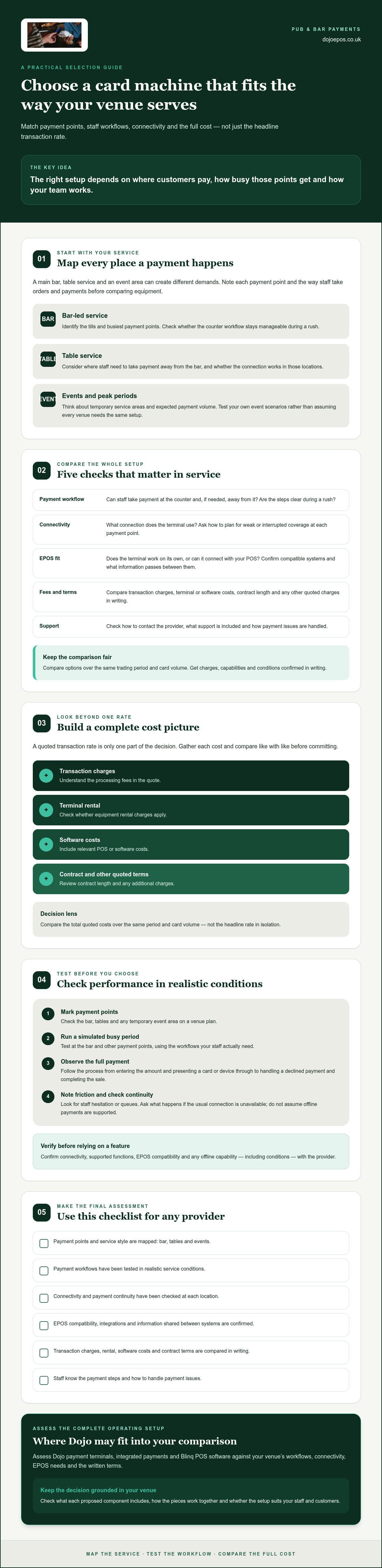
Choose a reliable payment setup for busy pub and bar service
A payment setup needs to work across the venue and make sense to the people using it. Before choosing card machines for pubs and bars, turn your service needs into a practical plan. This gives you a consistent way to assess providers, test the workflow and prepare staff before a busy shift.
Map payment points. Record where customers pay, from the main bar to tables or temporary event areas. Note which staff roles use each point and when demand is highest.
Define requirements. Separate essentials, such as suitable connection coverage and clear payment steps, from optional functions. If payments need to connect with your POS, confirm compatibility and exactly how the workflow operates.
Compare written quotes. Assess costs and terms against the same expected card activity and equipment needs. Review your current provider agreement before switching or adding terminals, including any relevant cancellation terms.
Test real workflows. Check the connection at each payment point and run realistic transactions during a simulated busy period. Try the usual customer journey, as well as routine situations such as a refund or a payment that needs attention.
Brief the team. Show staff the agreed process, who is responsible at each point and what to do if a terminal or connection needs attention.
What should you check before choosing a provider?
Use your venue map to ask specific questions. Confirm supported equipment and POS compatibility directly with the provider, along with connection expectations and available support arrangements. A connection that works at the bar may not be dependable in a side room or event space, so check coverage where staff will actually take payments. Review current terms before deciding to switch or add equipment.
How can you prepare staff for a new setup?
Keep training practical and focused. Walk staff through taking a payment, processing a refund and resolving routine issues. Agree who they should contact when equipment or connectivity needs attention. Establish a clear fallback procedure, but confirm with the provider which actions are supported. Test the whole service journey with the team before relying on it during a busy shift.
That preparation helps turn a provider choice into a workable day-to-day setup. To compare Dojo’s payment options with your venue’s requirements, explore Dojo payment solutions.
Assess Dojo for your pub or bar’s payment requirements
Dojo is a UK payment provider offering terminals, integrated payments and Blinq POS software. It’s an option to assess if you’re considering card acceptance and POS needs as parts of one operating setup. The right choice still depends on how your team takes payments, the systems you use and the written terms for your venue. Compare card machines for pubs and bars against your service requirements, rather than relying on a general recommendation.
When might Dojo be worth evaluating?
Consider Dojo if you want to assess terminals and POS requirements together. Check whether Dojo Go, Dojo Pocket or Blinq fits your intended workflow, and ask the provider to confirm current capabilities and compatibility. Evaluate support arrangements, settlement details and commercial terms against your venue’s needs. Verify any product feature, integration or payment schedule directly rather than assuming it’s included.
What should you ask before moving ahead?
Ask for a complete written proposal that sets out costs, rental, processing charges and contract conditions. Confirm which terminal and software capabilities are included, what connectivity each option requires and the scope of any integration with your existing EPOS. Make sure the proposal reflects your payment points, expected card activity and service pattern, rather than a generic setup.
Use these questions to guide your review:
Workflow: Which terminal is being proposed for each payment point, and how will staff use it?
Compatibility: Will the proposed setup work with your existing POS, and what functions are supported?
Connectivity: What connection does the equipment require, and what should staff do if it’s unavailable?
Terms: Which fees, rental charges, settlement conditions and contract commitments apply to your specific offer?
For more context on connected payment setups, read the integrated payment solutions guide. Then compare the proposal with your current arrangements and the workflows you tested earlier. If a detail is unclear, request written clarification before deciding.
Ready to assess the fit? Discuss your venue’s requirements with Dojo and request a proposal tailored to your payment flow, EPOS needs and terms for review.
Build a payment setup that keeps service moving
The right card machines for pubs and bars should fit the way your venue serves customers, from the bar to tables and event spaces. Start by listing your payment points, checking connectivity where staff will use the equipment and testing the full workflow under realistic conditions. Then compare written proposals using the same expected card activity, including transaction charges, rental, software and contract terms.
Clear staff processes matter too. Brief your team on taking payments, handling refunds and what to do if equipment or connectivity needs attention. A setup that suits your layout and is straightforward for staff to use can help keep service organised during busy periods.
Dojo states that it serves over 110,000 businesses worldwide and offers payment terminals, integrated payments and Blinq POS software. Assess these options against your venue’s requirements, and confirm capabilities, compatibility and terms in your proposal. Explore Dojo payment solutions for your pub or bar to compare them with your payment flow and EPOS needs.
Frequently Asked Questions
What type of card machine is best for a pub?
The best type depends on where customers pay and how your team serves them. A fixed counter may suit a bar-led venue, while a pub with table service or separate event areas may need terminals that can be used at those payment points. Check connection coverage, ease of use and whether the machine needs to work with your EPOS. Compare the full written terms as well as the features.
Can pubs use a card machine without an EPOS system?
Yes, a pub can use a standalone card machine to accept payments without an EPOS system. The terminal handles the payment, while an EPOS system can support wider sales and service workflows. Consider whether staff need payments to connect with orders or sales records, and confirm any integration requirements with the provider. If you choose a standalone setup, check how staff will record and reconcile transactions.
How much does a card machine cost for a pub?
Costs depend on the provider and proposal, so request a written, itemised quote rather than relying on a headline rate. Check transaction charges, terminal rental, relevant software fees, additional charges and any minimum commitments. Compare quotes using the same estimated card turnover, average sale and trading period. Review contract length, cancellation terms and settlement conditions too, so you can judge the full cost against your venue’s requirements.
Do pubs need more than one card machine?
Not always. The number you need depends on where payments happen and whether staff need to take them in more than one place at the same time. Map payment points, such as the main bar, another counter or tables, and consider demand during busy periods. Then test whether the proposed number of terminals supports the workflow without creating unnecessary equipment or rental costs.
Can a pub card machine keep taking payments if the internet goes down?
Only if the provider and terminal support a suitable way to process payments when the usual connection is unavailable. Don’t assume offline payment capability is included. Ask what happens if the internet or another connection fails, what transactions can be taken, and what conditions or risks apply. Confirm the procedure with the provider and give staff a clear fallback plan before relying on it during service.
Should a pub choose a card machine with next-day transfers?
Next-day transfers may suit a pub that values prompt access to takings, but check the provider’s terms before deciding. Confirm which transactions qualify, when funds are transferred, and whether cut-off times, non-working days or other conditions affect timing. Dojo offers next-day transfers, though you should verify the current settlement details for your specific proposal. Compare this alongside the processing, rental and contract terms.
To assess whether Dojo’s terminals, integrated payments or Blinq POS suit your venue, discuss your requirements with Dojo and review the proposal’s costs, compatibility and terms.


Comments