
Dojo vs Lightspeed Restaurant POS Integration: What UK Restaurants Should Compare in 2026
Can Dojo payments work with Lightspeed Restaurant POS without slowing service or complicating reconciliation? That’s the key question behind the dojo vs lightspeed restaurant pos integration decision. The answer depends on the connection available for your specific setup and the way your team takes payments.
It’s easy to assume a POS and a payment provider do the same job. In practice, Lightspeed Restaurant handles operational tasks such as orders and restaurant management, whilst Dojo focuses on payment processing. Understanding where each system fits is the first step towards choosing a setup that works at the till and behind the scenes.
This guide explains how the two roles differ and what to assess about an integration’s connection method, supported devices and shared data. You’ll also see how payment flow can affect busy service, reporting and reconciliation, so you can compare a Lightspeed setup with Dojo payments against Dojo’s Blinq POS option. The aim is to help you choose a setup that suits your restaurant’s workflow now and as it changes.
Table of Contents
Dojo vs Lightspeed Restaurant POS integration: understand what each system does
How Dojo and Lightspeed Restaurant integration can shape payment flow
Dojo vs Lightspeed Restaurant POS: compare the setup that fits your restaurant
Check these integration details before changing your restaurant POS
Where Dojo fits next: choose a payment setup built around service
Dojo vs Lightspeed Restaurant POS integration: understand what each system does
The comparison starts with two different jobs. POS software manages restaurant orders, till activity and operational workflows; a payment provider authorises and processes card transactions. Some setups connect these roles, but they aren’t interchangeable. For the dojo vs lightspeed restaurant pos integration question, the practical issue is whether the systems share the information your team needs and support the way you serve customers.
What does Lightspeed Restaurant POS manage?
Think of Lightspeed Restaurant as the operational POS layer: staff use it to handle orders and till workflows, whilst payment processing is a separate function. A customer’s order total may need to reach a payment terminal, and the result may need to appear in the POS record. The connection determines whether this happens automatically or staff need to take an extra step. Lightspeed Commerce’s company background is outlined by Lightspeed Commerce.
Where does Dojo fit in a restaurant payment setup?
Dojo sits on the payments side, providing payment services and terminals for card transactions. Its role is to process payments, rather than to be treated as the same restaurant POS platform as Lightspeed. Blinq is Dojo’s POS hardware and software product, offering a separate POS option. It isn’t part of Lightspeed Restaurant.
Keep the distinction clear at the point of service. A POS can hold the order and amount due; a payment provider handles the card transaction. If systems are connected, information may pass between them, but the connection determines exactly what transfers. That affects whether staff enter an amount twice and how they match POS records with payment activity later.
When assessing a Dojo and Lightspeed setup, establish the connection method, supported devices and software requirements, and which transaction or order details transfer. Then trace a typical sale from order to payment record. A general compatibility statement may not explain whether a particular restaurant workflow is supported.
In short, compare the systems by role first, then assess the connection between them. Lightspeed Restaurant is the POS layer in this comparison; Dojo is the payment provider, with Blinq as its own POS option. This helps you evaluate compatibility without assuming a particular device or data flow.
How Dojo and Lightspeed Restaurant integration can shape payment flow
A smooth payment journey depends on what happens between the order total and the final transaction record. The dojo vs lightspeed restaurant pos integration question isn’t only whether a card terminal can take payment. It’s also whether the setup passes useful information between systems and how staff can trace a sale afterwards.
What happens from order total to approved card payment?
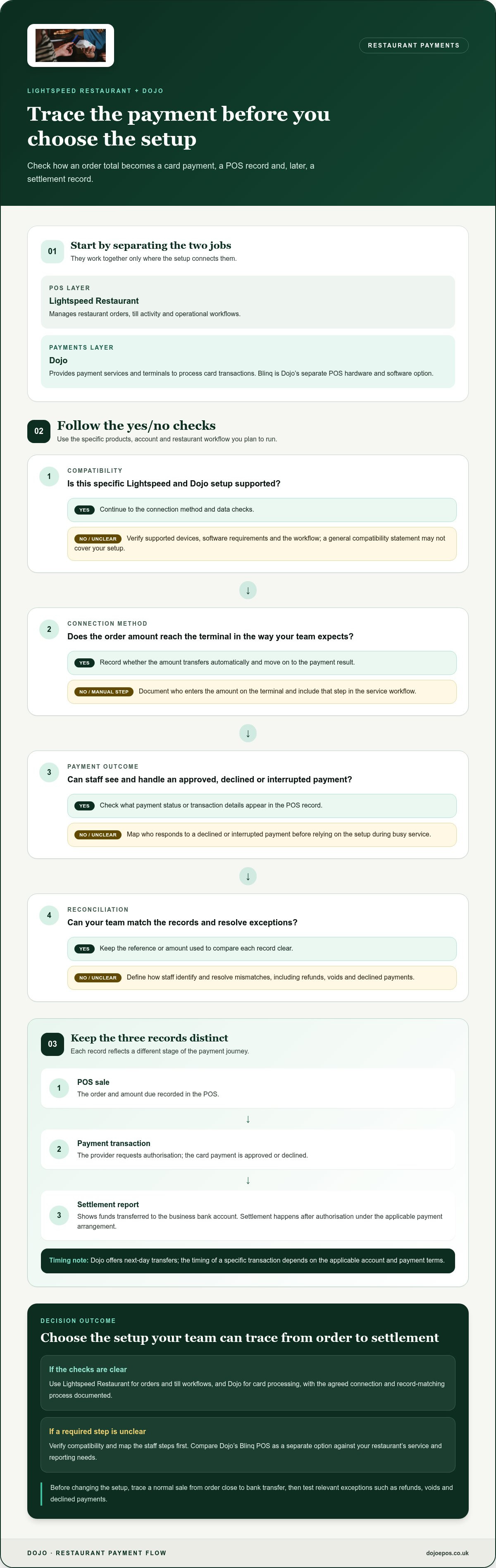
In a typical restaurant payment flow, staff finalise an order in the POS and identify the amount due. The customer presents their card to the payment terminal, the payment provider requests authorisation, and the transaction is approved or declined. The POS may then record the outcome, depending on how the systems are connected.
The connection method determines whether the amount transfers automatically, staff enter it on the terminal, or another step is involved. Map the actual process, including who handles a declined or interrupted payment, before relying on it during a busy service.
How do transaction records and reconciliation fit together?
There can be three records to compare: the POS sale, the payment transaction and the settlement report showing funds transferred to the business bank account. They represent different stages. An approved card payment confirms authorisation, whilst settlement and transfer happen later under the payment arrangement. Dojo offers next-day transfers; the timing of a specific transaction depends on the applicable account and payment terms.
Reconciliation is easier when you know which reference or amount appears in each record, and whether the POS receives payment status or transaction details. Check how the workflow represents refunds, voids and declined payments. If a refund appears in one system but not another, staff need a clear process to identify and resolve the mismatch. For more on how connected payment arrangements work, read this integrated payment solutions guide.
Before changing the setup, document the payment journey from order close to bank transfer. Mark which steps are automatic and which require staff input, then test a normal sale and relevant exceptions using the chosen configuration. This gives your team a workflow they can follow and check.
If you’re comparing a POS-led setup with Dojo’s own POS option, explore Blinq POS software as part of your evaluation.
Dojo vs Lightspeed Restaurant POS: compare the setup that fits your restaurant
There isn’t one right configuration for every restaurant. Compare what the POS needs to do during service, how payments will be taken and where staff will find a reliable record of each sale. In the dojo vs lightspeed restaurant pos integration decision, assess compatibility for the specific products, account and workflow rather than assuming the systems connect.
When might Lightspeed Restaurant with a separate payment provider suit?
This arrangement may suit a restaurant that wants to retain its established Lightspeed workflows and reporting. Factor in staff familiarity and service patterns, such as whether payment happens at the till or tableside. The deciding detail is how payment activity connects with the POS: establish what data transfers and which steps staff take, rather than assuming Dojo is connected.
When might a POS-and-payments setup from one provider suit?
A POS and payment arrangement from one provider may make it easier to understand which system owns each task and where to direct support queries. That doesn’t guarantee a simpler workflow, so assess the actual functions and reporting you need. Blinq gives restaurants a Dojo POS option to compare as a separate setup. See the Blinq POS comparison overview.
The best fit is the setup that supports your service workflow, produces usable records and has compatible POS and payment components. Compare the staff steps and reporting outcomes, not just the number of systems or providers.
To explore Dojo’s POS option alongside payment arrangements, see Dojo POS and payment options.
Check these integration details before changing your restaurant POS
A payment workflow that looks straightforward on paper can involve several steps at the till. Before changing systems, map how an order becomes a payment, what each system records and who handles a problem. This checklist helps you assess the dojo vs lightspeed restaurant pos integration for your restaurant’s actual setup.
Which compatibility and workflow details matter most?
Compatibility: Review the connection method, supported terminal models, software versions and account requirements for the products in your setup.
Payment steps: Establish how staff send or enter the amount due, and how the POS records an approved or declined payment. Include tips and split payments in the workflow review.
Exceptions: Test refunds and voids, where supported, and note which system initiates and records each action. Check what happens if a payment is interrupted or its status is unclear, so staff know how to avoid duplicate attempts.
Connectivity: Find out how network interruptions affect checkout and transaction records for the specific setup. Don’t assume a terminal or POS can continue processing offline.
Reporting and ownership: Identify where sales, payment transactions and settlement information appear, and assign responsibility for reconciliation and technical issues.
How can a restaurant prepare for a smoother changeover?
Start by documenting your current till routine, payment steps, reporting needs and staff responsibilities. Then test the proposed workflow in a controlled setting before relying on it during service. Run a routine sale, followed by the exceptions relevant to your restaurant, such as a refund, void or split bill. Confirm that staff can find the result in the expected records and know what to do if the outcome is uncertain.
Keep the test practical. Ask team members who use the till to follow the process, note where they need to pause or switch systems, and clarify who handles each issue. Give staff clear instructions and time to practise before introducing the new routine across shifts. Set a regular process for comparing POS sales with payment and settlement records.
Use the EPOS hardware buyer’s guide to consider hardware requirements as part of the wider setup. A documented workflow and controlled test can help you spot gaps before they affect service.
Review Dojo’s payment terminals and solutions as you plan the payment side of your restaurant setup.
Where Dojo fits next: choose a payment setup built around service
The right choice comes down to the workflow your restaurant needs, not simply the number of systems involved. For the dojo vs lightspeed restaurant pos integration decision, weigh four things: compatibility, the steps staff take during service, how sales and payment records line up, and who owns each part of the setup.
A quick decision framework for restaurant operators
Prioritise continuity? If your team relies on established Lightspeed Restaurant workflows, assess whether a separate payment arrangement can support them without adding friction. Base the decision on the connection and the actual steps staff must follow.
Want a more joined-up relationship? A POS-and-payments setup involving one provider may make responsibilities and support pathways easier to understand. Consider whether its POS functions, payment process and reporting meet your operational needs.
Planning for change? Compare how each option handles your service pattern, routine payments and exceptions. Make the final call once the connection, devices, software requirements and data flow are clear for your setup.
There’s no universal winner. Choose the arrangement that fits your restaurant’s day-to-day work and gives your team clear ownership of payments, POS records and issue resolution.
Explore Dojo payments and POS options
Dojo offers payment terminals, integrated payments and next-day transfers. Blinq is Dojo’s POS hardware and software option for businesses assessing a POS-and-payments setup. These are ways to evaluate Dojo’s offering on its own terms, not evidence of a connection with Lightspeed Restaurant. Keep any Lightspeed comparison grounded in the compatibility and workflow for your setup.
As you assess payment costs, use the Dojo card machine rates guide to understand the factors to consider. Compare the full payment arrangement with your expected service and reporting needs, rather than focusing on one headline rate.
Ready to shape a payment setup around the way your restaurant serves customers? Explore Dojo’s payment terminals and Blinq POS to find an option that matches your operational priorities.
Choose the payment setup that keeps service moving
The dojo vs lightspeed restaurant pos integration decision starts with the jobs each system performs, then turns on whether the connection supports your restaurant’s workflow. Prioritise compatible products, clear hand-offs at the till and records your team can reconcile. Don’t choose on an assumed integration alone.
Dojo focuses on payments, offering integrated payments and next-day transfers. For restaurants considering a POS alongside payments, Blinq is Dojo’s POS hardware and software product. Dojo serves over 110,000 businesses worldwide.
Choose the setup that fits how your team takes orders, processes payments and checks sales, both now and as your requirements change. Explore Dojo payments and POS solutions to see options for building a payment setup around your service. With the right workflow in place, your team can focus on delivering a smooth experience for every guest.
Frequently Asked Questions
Can Dojo integrate with Lightspeed Restaurant POS?
Compatibility depends on the products, market and integration method. For the dojo vs lightspeed restaurant pos integration question, distinguish a documented direct integration from a separate payment workflow, where staff may handle payment outside the POS connection. Review product documentation for the integration scope, data exchanged and any requirements. Don’t assume compatibility, features or support for a particular terminal unless the documentation confirms them.
What is the difference between Dojo and Lightspeed Restaurant?
Dojo is a payment provider offering payment terminals and integrated payments, whilst Lightspeed Restaurant is a POS product. They serve different roles, so a useful comparison looks at how the chosen POS and payment arrangement work together, including reporting and support responsibilities. Blinq is Dojo’s POS hardware and software product. It’s a separate Dojo option, not another name for Lightspeed Restaurant.
Can Lightspeed Restaurant process payments through a separate card machine?
That depends on the configuration and integration in use. A separate workflow may require staff to enter the sale amount on a card machine, whilst a connected payment flow may pass information between the POS and terminal. Don’t assume either method is available for a specific setup. Check the documented workflow, then assess how it matches transactions and handles errors or refunds.
Does a POS integration automatically reconcile restaurant payments?
No, an integration doesn’t necessarily reconcile every payment event automatically. A POS sales record, a card transaction and a settlement report each represent different information. A connection may pass selected details, but refunds, exceptions and settlement activity may still need separate review. Establish which data moves between systems, how records can be matched and how exceptions appear before relying on an integration for reconciliation.
What should a restaurant check before connecting a card machine to its POS?
Check the supported terminal models, software versions, connection method and transaction records for the selected configuration. Map how the team handles tips, refunds, voids and split bills, where those workflows apply. Test representative sales and exceptions before using the setup in live service, and confirm where staff can review each outcome. Requirements vary by configuration, so don’t assume devices or features are interchangeable.
Is Dojo or Lightspeed better for a restaurant?
Neither is a universal winner because Dojo and Lightspeed Restaurant serve different roles. The right choice depends on your POS requirements, payment compatibility, reporting, staff workflow and who owns support for each part. Compare the capabilities of the setup you intend to use, then assess whether Lightspeed Restaurant with a payment provider, Dojo payments or Dojo’s Blinq POS best fits your restaurant’s needs.
Will changing restaurant POS systems disrupt service?
It can, depending on preparation, staff familiarity, data and payment workflows, and when the change takes place. Document current till and payment processes before switching, train staff on their responsibilities, and test common transactions and exceptions ahead of launch. A controlled changeover helps identify unclear steps before they affect service, but the level of disruption and implementation time will depend on the restaurant’s systems and requirements.


Comments