
EPOS integration for card machines: 2026 UK guide
What if the hand-off between your till and card machine happened without staff entering the sale twice? That’s the practical benefit of epos integration for card machines: it connects the payment step to the EPOS sale so the amount can pass from one system to the other. If your team switches between screens or rekeys totals, it’s worth understanding how an integrated setup works, what needs to be compatible and how to introduce a change without disrupting trading.
This guide follows a sale from ringing it up to recording the card payment. It covers the compatibility, connectivity, reporting and staff-training questions to consider before choosing a setup, with practical ways to compare options against the way your business operates.
It also explains how Dojo’s Blinq point-of-sale hardware and software, alongside integrated payments, can support a more joined-up workflow. Whether you run a shop, café or restaurant, the aim is to make payments easier to manage without making the checkout harder for your team.
Table of Contents
What does EPOS integration for card machines actually mean?
EPOS integration for card machines means the electronic point of sale and payment terminal share relevant information during a connected checkout. The EPOS manages sales activity, such as building an order and calculating its total. The card machine accepts the customer’s card-present payment. A point of sale (POS) system can bring together the tools used to complete a sale, but the functions shared between systems depend on the setup.
With a standalone terminal, staff typically read the total from the till and enter it into the card machine separately. In an integrated flow, the sale amount can pass from the EPOS to the terminal, reducing that manual hand-off. The precise information shared, and how the systems respond, depends on the EPOS, terminal and configuration.
What happens in an integrated card payment?
The cashier builds the order in the EPOS, adding items or services and checking the sale total. When it’s time to take payment, the EPOS sends the amount to the connected terminal. The customer presents or inserts their card, and the payment is processed.
If the transaction is approved or declined, that result can be reflected in the sales workflow, depending on the setup. This helps staff see whether the sale has been paid without relying solely on a separate terminal display or manually matching amounts. Integration can remove repeated entry, but it doesn’t guarantee a faster service time.
Integrated, connected, or standalone: what is the difference?
A standalone card machine operates separately from the EPOS, so staff enter the till total on the terminal. A connected payment flow links the systems for specific parts of the transaction, such as sending the amount and returning a payment outcome. “Connected” doesn’t mean every business tool shares all data or updates in the same way.
For example, imagine a cashier spots that an item was entered twice. Before taking payment, they correct the order total in the EPOS. With a connected flow, the updated amount can be sent to the terminal. With a standalone machine, staff need to check the total and enter the corrected figure themselves. This can help avoid mismatched amounts, provided the systems are configured for that workflow.
Treat integration as a defined link between systems, not a blanket promise of compatibility. The EPOS model, payment terminal and configuration determine what information moves and when. Trace that transaction path first, then assess whether a connected setup fits your business.
How EPOS integration moves a card sale from till to transaction record
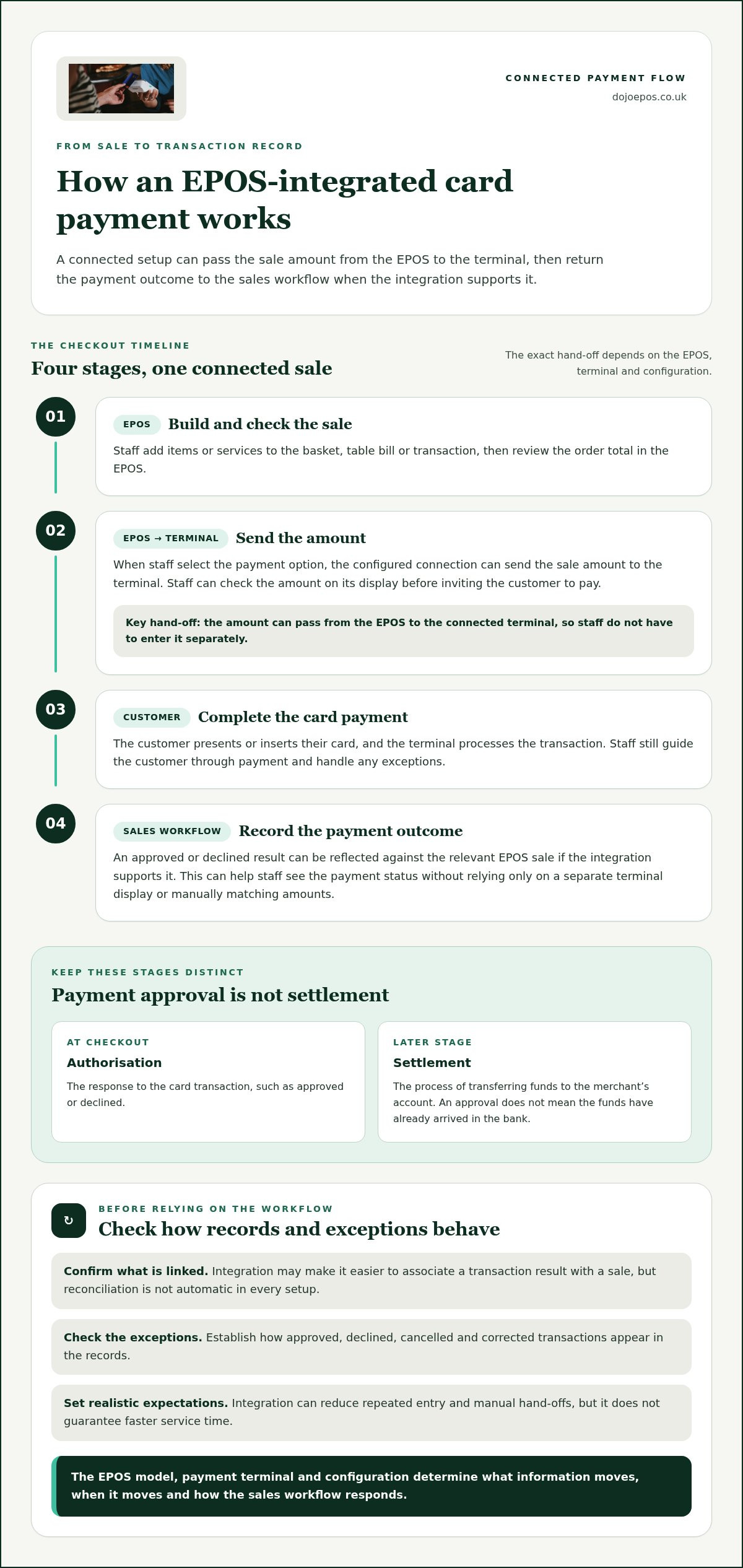
A connected payment links stages of a card sale, from the order on screen to the payment result recorded against it. The aim is to reduce manual hand-offs, such as re-entering the same total, not to guarantee that every checkout will be faster. Staff still need to check the sale, guide the customer through payment and handle exceptions.
A connected terminal receives the sale amount from the EPOS, so staff don’t have to enter it separately. Here’s how that flow can work.
From EPOS order to card machine prompt
First, staff complete the basket, table bill or other transaction in the EPOS. When they select the option to take payment, the configured connection can send the amount to the terminal. Staff can check the amount on the terminal before inviting the customer to pay. The customer then presents or inserts their card, and the terminal processes the transaction.
Build: Add items or services and review the order total in the EPOS.
Send: Pass the amount to the connected terminal, where the setup supports this.
Pay: Let the customer complete the card transaction.
Record: Return the payment outcome to the sales workflow, if the integration supports it.
That final step matters. An approved or declined result may be associated with the relevant EPOS sale, helping staff see its payment status. The precise behaviour depends on the systems and configuration, so check how the setup handles records and exceptions rather than assuming every connection works identically.
From payment result to reporting and reconciliation
A payment record and a bank transfer describe different stages. Authorisation is the response to the card transaction, such as approved or declined. Settlement is the later process of transferring funds to the merchant’s account. A recorded approval doesn’t mean the funds have already arrived in the bank.
Reconciliation means matching EPOS sales with payment records and, where relevant, settlement information. Integration may make it easier to associate a transaction result with a sale, but reconciliation isn’t automatic in every setup. Establish which records are linked, what staff need to review and how exceptions, such as a cancelled or corrected sale, appear. The Payment Systems Regulator (PSR) provides information about the wider UK payment systems environment.
For businesses planning a connected workflow, Dojo EPOS and card payments bring point-of-sale and payment options together. Dojo also offers next-day transfers. Keep that settlement stage distinct from the payment approval shown during checkout.
Integrated or standalone card machine: how to compare the right setup
The right choice depends on how your team takes payments and keeps track of sales. A standalone terminal can be a practical fit for a straightforward checkout. EPOS integration for card machines may help where staff handle frequent transactions or repeated entry adds friction. Compare the everyday workflow, not just the equipment on the counter.
When can a standalone card machine be enough?
For a straightforward checkout with few transactions or little need to link sales and payment records, a separate terminal may suit the way the business works. Staff enter the amount themselves, then may need to match terminal records with EPOS sales during routine checks. That’s an extra step, but it doesn’t make a standalone setup inherently unreliable or unsuitable.
When can an integrated EPOS and card machine help?
A connected flow can be useful at a busy till, across a team of staff, or wherever manual entry adds friction to repeated transactions. It may also help if you want payment records associated with sales for routine reconciliation. The records and functions available depend on the systems and setup, so assess the specific workflow rather than assuming every integration reports the same information.
A common mistake is assuming that buying an EPOS makes any card machine compatible. It doesn’t. Integration depends on whether the systems can connect and how that connection is configured. Check compatibility for the specific EPOS and terminal, then account for any connection or configuration requirements.
For a wider view of the equipment involved, explore this EPOS hardware buyer’s guide. Compare each option against the steps your staff take, the records your business needs and the way customers pay. This gives you a clearer basis for choosing a workflow that fits daily trading.
How to prepare and roll out EPOS integration without disrupting trade
A careful rollout starts with the checkout your team uses today, not the equipment you hope to install. Map how a sale moves from order to payment, where staff enter or check information, and what happens if a transaction is cancelled or corrected. This makes it easier to plan epos integration for card machines around real trading needs and reduce avoidable disruption.
What should a business check before setup?
Write down the EPOS software and card terminals in use, how many checkout points need the connection, and the usual payment flow. A counter-service shop, a restaurant handling table bills and a business with several tills may each need a different setup. Include staff roles, receipt handling and how sales are reconciled at the end of the day.
Before configuration, establish whether the specific EPOS and terminals can work together and note any connection or setup requirements. An EPOS alone doesn’t guarantee compatibility with every card machine. Record the agreed workflow for each till, including what staff should see on the EPOS and terminal, and who handles exceptions.
How should staff test and adopt the new workflow?
Configure and test the connection before using it in normal trading. In a planned test session, check that the amount moves correctly, staff can verify it before payment and the outcome is clear on the relevant screens. Work through these scenarios:
Approved: Complete a test sale and check how its payment status appears in the sales workflow.
Declined: Confirm staff know what the terminal and EPOS show and how to proceed without treating the sale as paid.
Cancelled: Check how a cancelled payment or order is handled and recorded.
Corrected: Change an item or total before payment, then make sure the correct amount is presented for payment.
Walk each staff member through a normal sale, a refund, a cancellation and a common correction. Practise at every relevant till, and make sure the team understands when to check the terminal, what to do if the screens don’t match, and whom to alert if a payment issue occurs. Test receipt handling and the end-of-day process too. Reconcile sample sales against payment records so staff know which records to compare and how to flag a mismatch.
Use the integrated payment solutions guide to explore the wider context of payment channels. For a joined-up point-of-sale and payment workflow, Dojo EPOS solutions bring those options together.
How Dojo brings EPOS and card payments into one business workflow
Dojo is a UK payment provider offering card-present and online payments. Its Blinq product combines point-of-sale hardware and software, while Dojo’s integrated payments support businesses looking to bring EPOS and card payments into a more connected workflow. Dojo serves over 110,000 businesses worldwide.
The right epos integration for card machines depends on how your business trades, how staff take payments and what information they need to handle each sale. A joined-up approach can reduce separate steps, but the specific functions and records available depend on the systems and their configuration.
What to look for in a Dojo EPOS and card payment setup
Start with the checkout process. Consider whether staff serve customers at a counter, take orders at tables or move between checkout points. Then look at how Blinq, integrated payments and card-present hardware can fit that routine. Dojo Go and Dojo Pocket are payment terminal options for card-present payments. Assess the full setup rather than assuming a particular terminal and EPOS configuration will connect in a specific way.
Think through the staff experience: how a sale is entered, how the payment amount is handled and what staff see after a payment. Also consider how your business will review sales and payment records during reconciliation. These practical details help you judge whether a setup supports your workflow and what your team will need to do at each step.
Include payment costs in your comparison. Consider the fees that apply to your business and how your card turnover affects the overall picture. For a fuller breakdown of what to consider, read Dojo’s card machine rates guide. Dojo also offers next-day transfers. Settlement timing is separate from card authorisation, and the handling of funds can depend on the transaction and applicable terms.
What are the next steps for a connected payment workflow?
Map your current checkout from order entry through payment and record keeping. Identify where staff repeat work, re-enter totals or pause to check separate systems. Then assess the EPOS, payment terminal and configuration against your daily process. A well-planned setup can make the steps clearer for staff and help keep sales and payments organised, without assuming every business needs the same workflow.
To explore a connected setup for your business, view Dojo’s EPOS and card payment solutions.
Build a payment workflow that works for your team
Effective epos integration for card machines is about making the hand-off between sale and payment fit your everyday operation. Compare standalone and connected workflows based on staff steps, record keeping and setup needs. Before switching, map your checkout, test approved, declined, cancelled and corrected transactions, then train staff on what to do at each stage.
Keep payment approval distinct from settlement, and make sure your team understands how sales and payment records are reviewed. A clear process can reduce unnecessary rekeying and help staff handle routine transactions with confidence.
Dojo serves over 110,000 businesses worldwide. Its Blinq product combines point-of-sale hardware and software, and Dojo offers integrated payments and next-day transfers. These options are relevant to businesses exploring a more connected point-of-sale workflow.
Explore Dojo’s EPOS and card payment solutions to take the next step towards a checkout that suits your business and your staff.
Frequently Asked Questions
What does EPOS integration with a card machine mean?
EPOS integration with a card machine connects the till and payment terminal so relevant sale information can pass between them. In a connected workflow, the EPOS can send the sale total to the terminal, rather than staff entering it separately. Depending on the setup, the payment result may also appear in the sales workflow. The aim of epos integration for card machines is to reduce manual hand-offs, not to make every business tool share all its data.
Can any card machine integrate with any EPOS system?
No. Compatibility depends on the specific EPOS software, payment terminal and how the connection is configured. Owning an EPOS doesn’t automatically make it compatible with every card machine. Before choosing a setup, identify the exact systems and checkout points involved, then establish what information the connection supports, such as sending the transaction amount or returning a payment result. Don’t assume that two devices can integrate simply because they’re both used to take payments.
How does an integrated card machine process a sale?
Staff first build the basket, table bill or transaction in the EPOS and review the total. In a supported connected setup, they send that amount to the card machine, check the terminal display and invite the customer to pay. The terminal processes the card transaction and returns an outcome. Depending on the configuration, that result may be associated with the relevant EPOS sale. Staff should follow the agreed process if a payment is declined or cancelled.
Is an integrated card machine better than a standalone terminal?
Neither option is automatically better. The right fit depends on your checkout routine. A standalone terminal may suit a simple operation with few transactions or little need to link payment and sales records. Integration can reduce repeated amount entry, which may be useful at busy tills or when several staff handle sales. Compare the setup requirements with the manual steps your team currently performs, then choose the workflow that best supports daily trading.
Does EPOS integration automatically reconcile card payments?
No. Integration may link a payment outcome to an EPOS sale, but that doesn’t necessarily reconcile all sales, payment records and bank transfers automatically. Reconciliation means comparing those records to identify matches or differences. The information available and the amount of manual review required depend on the systems and configuration. Set a clear routine for checking records, including how staff handle cancelled transactions, refunds and any mismatch between a sale and its payment record.
Will integrating a card machine disrupt business operations?
A change can affect checkout routines, but careful preparation helps limit disruption. Map the current process, identify the devices and tills involved, then configure and test the new workflow before using it in normal trading. Practise approved, declined, cancelled and corrected transactions, as well as refunds. Train staff on what appears on each screen and how to handle issues. Plan the rollout around your trading needs and make sure the team knows who handles exceptions.
Can Dojo connect card payments with an EPOS system?
Dojo offers integrated payments, and Blinq combines Dojo point-of-sale hardware and software. These are options for businesses seeking a connected EPOS and card payment workflow. The exact functions, compatibility and records depend on the specific systems and configuration, so assess the workflow you need rather than assuming every setup behaves identically. Dojo serves over 110,000 businesses worldwide and also offers payment terminals and next-day transfers.
What should I compare when choosing EPOS integration for card machines?
Compare how the sale amount reaches the terminal, whether payment outcomes link to sales, the steps staff must follow and how you’ll reconcile records. Check compatibility between the specific EPOS and terminal, configuration needs, the number of checkout points and your usual payment flow, such as counter sales or table service. Consider whether a standalone setup already meets your needs or whether epos integration for card machines could reduce repeated entry in your day-to-day workflow.


Comments