
Reduce Queue Times: Fast Payments Guide for UK Businesses
What if the longest pause in your queue happens at the till, not before it? Busy periods put checkout steps under pressure, and a slow or awkward payment can interrupt staff just as customers are ready to leave. Payments aren’t always the only bottleneck. To reduce queue times with fast payments, first see how checkout fits into the full service flow.
The challenge is pinpointing what’s causing the delay: payment, order entry, staff handovers or another step. Faster payment options can remove checkout friction, but they work best as part of a smooth, well-organised process.
This guide shows you how to identify avoidable delays, choose practical payment improvements for the way you serve customers, and measure their effect on service flow. You’ll see where faster payments fit into the wider queue, what to review first, and how options such as Dojo Go, Dojo Pocket and Blinq POS software can fit into your checkout workflow.
Table of Contents
How fast payments can reduce queue times at checkout
Fast payments aren’t just transactions processed quickly. They make the payment journey straightforward, with a clear total, an easy way to present a payment method and an obvious confirmation when the transaction is authorised. Improving this stage can help reduce queue times with fast payments, but it won’t guarantee a shorter end-to-end service time.
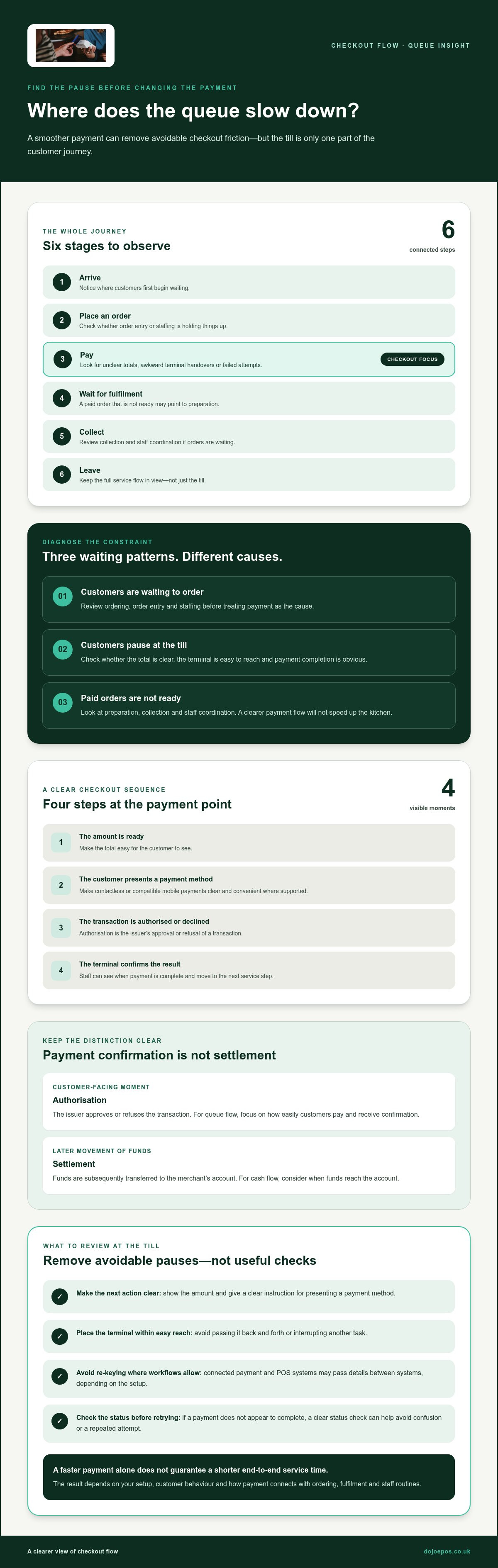
Look at the whole journey: customers arrive, place an order, pay, wait for fulfilment, collect their purchase and leave. Queueing theory examines how waiting lines form and move. For your business, the practical lesson is to identify where customers are waiting before deciding which step to change.
Where payment delays enter the customer journey
Payment friction often shows up at the till. A customer may not see the total clearly, staff may need to repeat an amount, or the terminal may be passed back and forth. A failed attempt can mean starting again. Each interruption breaks staff rhythm, and repeated delays during a busy period can turn checkout into a regular pause.
Separate payment delays from other hold-ups. If customers are waiting to place an order, the cause may be ordering or staffing. If orders are paid for but not ready, preparation or collection may be the constraint. In a café, for example, a clear payment flow may help the next customer complete checkout while staff prepare earlier orders. It won’t speed up the kitchen.
What fast payments can, and can’t, change
A smoother payment journey can remove avoidable steps at checkout. It can’t fix every source of delay, and faster payment alone doesn’t guarantee a shorter queue. The outcome depends on your setup, customer behaviour and how payment connects with ordering, fulfilment and staff routines. Review the full journey before treating the till as the cause.
Authorisation is approval for a payment; settlement is the later movement of funds to the merchant’s account. The customer-facing moment of payment completion is not the same as settlement. For queue flow, focus on how easily customers pay and receive confirmation. For cash flow, consider when funds reach the account. These are related parts of the payment experience, but they address different operational needs.
How faster payment journeys keep checkout moving
A clear payment journey gives customers and staff an easy next step at the till. The amount is ready, the customer presents a payment method, the transaction is authorised or declined, and the terminal confirms the result. Removing avoidable pauses can help reduce queue times with fast payments, although the experience also depends on the payment setup and what happens around it.
Authorisation is the issuer’s approval or refusal of a transaction. Settlement is the subsequent process through which funds are transferred to the merchant’s account, so a customer can receive payment confirmation before the money reaches the business.
Contactless and mobile payments at the point of sale
Customers may present a contactless card or a compatible mobile device, such as a phone or watch, when the till supports that payment method. Make the amount easy to see and the instruction clear. Position the terminal where customers can reach it comfortably, rather than passing it back and forth or interrupting another task.
These details help customers understand what to do without guesswork. Acceptance and the steps required can vary with the payment method, card or device, terminal setup and customer actions. Don’t assume every customer will use contactless or that each transaction will complete in a fixed time.
The role of payment terminals and POS workflows
Terminal placement matters. A device within easy reach and ready for the customer makes the handover more straightforward. Staff should also be able to see when payment is complete, so they can move to the next service step without uncertainty or unnecessary repetition.
When payment and point-of-sale workflows are connected, details may flow between systems instead of being entered more than once. This can reduce manual steps, such as re-keying a total, depending on how the business has set up its process. Learn more about how integrated payment solutions fit into a wider checkout workflow.
Keep the whole transaction in view. Connectivity interruptions may stop a request moving smoothly between systems, while the issuer’s response, terminal setup or customer actions can introduce further pauses. If a payment doesn’t appear to complete, staff need a clear way to check its status before trying again. This helps avoid confusion or a repeated attempt.
When reviewing your checkout, look beyond whether a terminal is fast. Consider how customers reach it, how the sale is entered, what prompts appear and how staff confirm completion. A well-placed terminal and joined-up workflow can support a smoother payment journey, while ordering, preparation or staffing may still shape the queue overall.
Which queue-reduction tactics work alongside fast payments?
Faster payment can remove friction at the till, but it won’t automatically clear a queue or increase how many customers your business can serve. If orders take time to enter or prepare, a quicker transaction may simply move the wait to the next stage. Match the change to the bottleneck, then review its effect on both flow and service quality.
Match the intervention to the bottleneck
Start by observing where customers pause. Payment-stage friction may call for better terminal access, clearer instructions or fewer checkout steps. If order entry is the hold-up, review menus, ordering processes and POS workflows. If paid orders are waiting, focus instead on preparation, collection and staff coordination. Treat these as separate problems so a payment change doesn’t distract from the real constraint.
Balance speed, accessibility and customer confidence
Fast service should still feel clear and considerate. Use readable prompts, explain the next step when needed and keep payment options suited to your business and customers. Not everyone will be equally comfortable with the same method. Staff also need time to confirm the amount and outcome without being rushed into mistakes or repeated attempts.
Keep security in the process. Don’t remove sensible checks or ask staff and customers to trade confidence for speed. A dependable checkout helps customers understand what they’re paying and whether the transaction has completed.
To reduce queue times with fast payments, consider payment improvements alongside staff workflow, clearer ordering and queue measurement. Change the step causing the delay, then watch for unintended effects. A faster till is useful only if it improves the wider experience without shifting the wait or weakening service.
How to test whether fast payments reduce your queue times
A simple, repeatable trial can show whether a payment change improves customer flow or simply shifts the wait elsewhere. Observe the queue, record a baseline, choose one change, trial it and review the results. This helps you reduce queue times with fast payments based on what happens in your business, not assumptions.
Set a useful baseline without overcomplicating measurement
Before changing the payment process, observe representative busy and quieter periods. Use the same measures each time, and ask staff to record them consistently. A simple tally or shared log can reveal where customers are waiting and whether payment is part of the delay.
Keep payment completion separate from total queue time. One captures the payment stage; the other reflects the wider journey, from joining the queue to finishing service. Track:
Queue length at regular observation points
Time taken to complete payment
Failed or repeated payment attempts
Brief customer feedback and staff observations
Run a focused trial and review the results
Choose one change that addresses the suspected bottleneck, such as improving terminal placement or simplifying a checkout step. Where practical, avoid changing several things at once. If payment prompts, staffing and ordering all change together, it becomes harder to tell what made the difference.
Compare like with like. Review similar service periods and note factors that could affect the result, including staffing levels, customer demand and fulfilment pressure. A before-and-after comparison is meaningful only when you measure the same things under comparable service conditions.
During the trial, look beyond the numbers. Did staff find the process easier to manage? Were customers clear about what to do? Did errors, repeated attempts or service pressure increase? A shorter payment time may not improve the overall experience if customers become confused or staff have to correct more mistakes.
Review the evidence together, then keep, adjust or stop the change. If the payment stage improves but the queue remains, use your observations to identify whether ordering, preparation or collection is now the constraint. See how Dojo payment and POS solutions can fit your checkout setup.
Put faster payments into practice with Dojo
Start with the bottleneck your observations revealed. If customers hesitate at payment, focus on how they reach and use the terminal. If staff repeat steps to enter an order or amount, consider whether the POS and payment workflow should fit together more closely. The aim is to reduce queue times with fast payments by addressing a specific friction point, not choosing a product before you know what needs to change.
Choose a payment setup around your service flow
Map how customers move through your business: where they order, where they pay, who handles the terminal and how the order reaches fulfilment. A card machine may suit a checkout where customers pay at a counter, while POS software may help if order entry is part of the delay. Integrated payments can reduce repeated manual steps between sales and payment when those steps are creating friction.
Dojo offers Dojo Go and Dojo Pocket card machines, Blinq POS software and integrated payments. Choose a combination around your service flow, payment needs and operating environment. Before changing your setup, write down the issue you want to solve and the measure you’ll use to review the result. For further background, read the guide to Dojo card machine rates.
Make the next step a measured improvement
Use your trial findings to define a practical requirement. You might need a payment setup that better suits where customers pay, or a POS workflow that reduces repeated order-entry steps. Consider how a change will affect staff routines and the customer experience, then compare the results with your baseline rather than assuming a new terminal will shorten every queue.
Dojo’s payment and POS options can form part of a more deliberate checkout workflow. For hospitality businesses, the guide to improving restaurant table turnover with better payments explores another way payment processes connect with service flow. Keep the focus on the operational issue you’ve identified and the outcome you want to measure.
To explore a payment setup for your business, view Dojo payment solutions and consider how Dojo Go, Dojo Pocket, Blinq POS software or integrated payments could fit into your checkout process.
Make your next checkout improvement count
Faster payments can remove friction at the till, but the best results start with finding the real bottleneck. Map the customer journey, distinguish payment delays from ordering or fulfilment hold-ups, then test one focused change against a consistent baseline. That’s how to reduce queue times with fast payments without assuming a quicker transaction will solve every delay.
Choose a setup that fits how your customers pay and how your team serves them. Dojo provides card-present and online payment solutions to UK businesses, including Dojo Go, Dojo Pocket, Blinq POS software and integrated payments. These options can form part of a checkout workflow shaped around your operational needs.
Ready to explore a payment setup for your business? Explore Dojo payment solutions for your business. Start with the friction you’ve identified, make a considered change and build a smoother experience for your customers and team.
Frequently Asked Questions
Can faster payments reduce queue times?
Yes, a smoother payment journey can reduce avoidable pauses at checkout, particularly if customers struggle with unclear prompts, terminal hand-offs or repeated attempts. It won’t necessarily shorten the whole queue: ordering, staffing or fulfilment may be the real constraint. To reduce queue times with fast payments, identify where customers wait, test a change at that stage and check whether it improves the wider service flow.
How do fast payments help a business serve customers more quickly?
They can make it easier for a customer to present a payment method, complete the transaction and see confirmation. Clear instructions and fewer unnecessary hand-offs can also help staff move smoothly to the next task. The impact depends on the business’s setup and customer behaviour. If orders take time to prepare, a smoother payment process may improve checkout without speeding up fulfilment.
Do contactless payments make queues move faster?
Contactless can make payment straightforward: a customer presents a contactless card or compatible mobile device to the terminal. But it won’t make every transaction faster or suit every customer. Terminal setup, connectivity, issuer response and customer actions can all affect the experience. Keep prompts clear and payment options appropriate for your business, then observe whether contactless reduces pauses at checkout.
What is the difference between payment processing and settlement?
Payment processing covers the steps involved in handling a transaction, including requesting authorisation and receiving a response. Settlement is the later movement of funds to the merchant’s account. A payment can be authorised and confirmed to the customer before settlement is complete. The distinction matters because checkout concerns completing the payment, while settlement concerns when the business receives the funds.
How can I tell whether payments are causing my queues?
Observe customers from joining the queue through ordering, payment and fulfilment. Look for pauses at the till, unclear totals, repeated attempts, terminal hand-offs or staff re-entering information. Compare these with delays before payment, such as waiting to order, and after payment, such as waiting for an item. Record what happens during representative busy and quieter periods before deciding which step to change.
Can a card machine or POS system reduce checkout delays?
It can help if the delay comes from payment access, unclear steps or repeated manual entry. A well-placed card machine may make the customer handover easier, while POS software or integrated payments may suit workflows where order and payment steps need to connect. The right setup depends on how your business serves customers. A new system won’t resolve a bottleneck caused by preparation or staffing.
How should a business measure queue times before and after a change?
Record a baseline, make one practical change where possible, then repeat the same observations during comparable service periods. Track queue length, time to complete payment, failed or repeated attempts, and customer feedback. Note differences in demand, staffing and fulfilment, as these can affect the result. Compare like with like, and check that any improvement in flow hasn’t brought more confusion, errors or pressure on staff.


Comments